使用 TextChatService,您可以使用气泡聊天在用户头像和NPC上方显示可自定义的语音聊天气泡。气泡聊天可以使您的游戏更加视觉沉浸,并帮助用户在上下文相关的方式中轻松识别消息及其发言者。此功能对于用户在与他人沟通的同时需要专注于内容的游戏特别有用。
启用气泡聊天
要在您的游戏中启用气泡聊天:
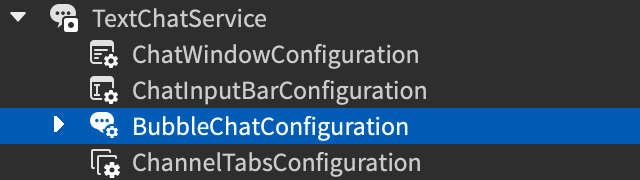
在 Explorer 窗口中,选择 BubbleChatConfiguration 下的 TextChatService。
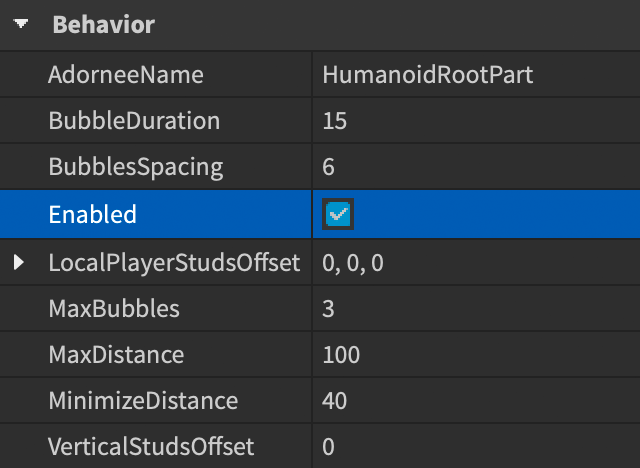
在 Properties 窗口中,勾选 BubbleChatConfiguration.Enabled 复选框。

气泡自定义
启用气泡聊天后,您可以自定义聊天气泡的外观和行为,以匹配您游戏的主题。使用 BubbleChatConfiguration 的 Properties 窗口进行 基本 更改,如文本颜色和间距,或实施 高级 自定义,以自定义气泡背景图像和其他视觉调整。

另外,可以在 StarterPlayerScripts 中添加 LocalScript,以包含所有自定义设置。这允许引擎在运行时应用您的自定义设置,覆盖Studio中的设置。在用户触发某些事件或条件时,为聊天气泡添加特效是很有用的。
基本自定义
以下表格显示了常见的气泡聊天自定义属性。有关自定义属性的完整列表,请参见 BubbleChatConfiguration。
| 属性 | 描述 | 默认 |
|---|---|---|
| BackgroundColor3 | 气泡的背景颜色,类型为 Color3。 | [250, 250, 250] |
| FontFace | 气泡文本的 Font。 | BuilderSansMedium |
| TextColor3 | 气泡文本的颜色,类型为 Color3。 | [57, 59, 61] |
| TextSize | 气泡文本的大小。 | 16 |
高级自定义
对于气泡的高级自定义,添加表示气泡外观某些方面的UI对象作为 BubbleChatConfiguration 下的子对象,包括:
- ImageLabel 用于背景图像设置。
- UIGradient 用于背景渐变设置。
- UICorner 用于气泡的角型状。
- UIPadding 用于文本与气泡边缘之间的内边距,相对于父级的正常大小。
添加这些对象后,您可以修改这些对象的属性,以适用于气泡聊天的高级自定义。以下示例 LocalScript 为气泡添加了背景图像和尖角:
local TextChatService = game:GetService("TextChatService")

local bubbleChatConfiguration = TextChatService.BubbleChatConfiguration
bubbleChatConfiguration.TailVisible = false
bubbleChatConfiguration.TextColor3 = Color3.fromRGB(220, 50, 50)
bubbleChatConfiguration.FontFace = Font.fromEnum(Enum.Font.LuckiestGuy)

local bubbleUICorner = bubbleChatConfiguration:FindFirstChildOfClass("UICorner")
if not bubbleUICorner then
	bubbleUICorner = Instance.new("UICorner")
	bubbleUICorner.Parent = bubbleChatConfiguration
end
bubbleUICorner.CornerRadius = UDim.new(0, 0)

local bubbleUIPadding = bubbleChatConfiguration:FindFirstChildOfClass("UIPadding")
if not bubbleUIPadding then
	bubbleUIPadding = Instance.new("UIPadding")
	bubbleUIPadding.Parent = bubbleChatConfiguration
end
bubbleUIPadding.PaddingTop = UDim.new(0, 20)
bubbleUIPadding.PaddingRight = UDim.new(0, 10)
bubbleUIPadding.PaddingBottom = UDim.new(0, 15)
bubbleUIPadding.PaddingLeft = UDim.new(0, 10)

local bubbleImageLabel = bubbleChatConfiguration:FindFirstChildOfClass("ImageLabel")
if not bubbleImageLabel then
	bubbleImageLabel = Instance.new("ImageLabel")
	bubbleImageLabel.Parent = bubbleChatConfiguration
end
bubbleImageLabel.Image = "rbxassetid://109157529833093"
bubbleImageLabel.ScaleType = Enum.ScaleType.Slice
bubbleImageLabel.SliceCenter = Rect.new(40, 40, 320, 120)
bubbleImageLabel.SliceScale = 0.5
以下表格列出了可用的 GuiObject 和 外观修改器 子对象及其有效的自定义属性:
| 属性 | 描述 | 默认 |
|---|---|---|
| Image | 气泡背景图像的资产ID。 | |
| ImageColor3 | 气泡背景图像的颜色色调,类型为 Color3。 | [255, 255, 255] |
| ImageRectOffset | 显示的图像区域自左上角的偏移(以像素为单位)。 | (0, 0) |
| ImageRectSize | 显示的图像区域的大小(以像素为单位)。要显示整个图像,请将任一维度设置为 0。 | (0, 0) |
| ScaleType | 当图像大小与气泡的绝对大小不同时,用于渲染图像的缩放类型。 | Stretch |
| SliceCenter | 如果图像是九slice(9-sliced)图像,则为该图像的切片边界。仅在您将 ScaleType 设置为 Slice 时适用。 | (0, 0, 0, 0) |
| SliceScale | 如果图像是九slice(9-sliced)图像,则为切片边缘的缩放比例。仅在您将 ScaleType 设置为 Slice 时适用。 | 1 |
| TileSize | 图像的平铺大小。仅在您将 ScaleType 设置为 Tile 时适用。 | (1, 0, 1, 0) |
按气泡定制
您可以根据特定条件单独样式化和修改聊天气泡的行为,以覆盖您的通用设置。例如,您可以使用聊天气泡来区分NPC和用户,高亮显示关键健康状态,并对具有预定义关键字的消息应用特效。
要设置气泡的自定义,请在客户端添加一个 LocalScript,使用 BubbleChatMessageProperties,该类覆盖与 BubbleChatConfiguration 匹配的属性,并使用 TextChatService.OnBubbleAdded 回调指定如何自定义每个气泡。回调为您提供 TextChatMessage 属性以及附着点,因此您可以根据与用户相关的属性、聊天文本内容、用户角色属性以及您希望定义的任何特定条件应用自定义。
以下基本自定义属性可用于每个气泡的自定义:
| 属性 | 描述 | 默认 |
|---|---|---|
| BackgroundColor3 | 气泡的背景颜色,类型为 Color3。 | (250, 250, 250) |
| BackgroundTransparency | 气泡的背景透明度。 | 0.1 |
| FontFace | 气泡文本的 Font。 | BuilderSansMedium |
| TextColor3 | 气泡文本的颜色,类型为 Color3。 | [57, 59, 61] |
| TextSize | 气泡文本的大小。 | 16 |
以下示例通过检查聊天消息发送者是否具有 IsVIP 属性,为VIP用户的聊天气泡添加特殊外观:
local TextChatService = game:GetService("TextChatService")
local Players = game:GetService("Players")

-- 新聊天气泡添加到游戏时的事件处理器
TextChatService.OnBubbleAdded = function(message: TextChatMessage, adornee: Instance)
	-- 检查聊天消息是否与 TextSource (发送者) 相关联
	if message.TextSource then
		-- 创建新的 BubbleChatMessageProperties 实例以自定义聊天气泡
		local bubbleProperties = Instance.new("BubbleChatMessageProperties")

		-- 根据其 UserId 获取发送聊天消息的用户
		local player = Players:GetPlayerByUserId(message.TextSource.UserId)

		if player:GetAttribute("IsVIP") then
			-- 如果玩家是VIP,则自定义聊天气泡属性
			bubbleProperties.TextColor3 = Color3.fromHex("#F5CD30")
			bubbleProperties.BackgroundColor3 = Color3.fromRGB(25, 27, 29)
			bubbleProperties.FontFace = Font.fromEnum(Enum.Font.PermanentMarker)
		end
		return bubbleProperties
	end
end
所有高级自定义选项都可用于按气泡定制。类似于通用气泡的高级自定义,将您希望自定义的实例作为 BubbleChatMessageProperties 的子对象添加。以下示例通过检查聊天消息发送者的 Humanoid.Health 属性,为生命值状态较低的用户聊天气泡添加特殊渐变效果及其他属性:
local TextChatService = game:GetService("TextChatService")
local Players = game:GetService("Players")

-- 新聊天气泡添加到游戏时的事件处理器
TextChatService.OnBubbleAdded = function(message: TextChatMessage, adornee: Instance)
	-- 检查聊天消息是否与 TextSource (发送者) 相关联
	if message.TextSource then
		-- 根据用户的 UserId 获取发送聊天消息的用户
		local player = Players:GetPlayerByUserId(message.TextSource.UserId)

		-- 在用户角色中查找 humanoid
		local humanoid = player.Character:FindFirstChildWhichIsA("Humanoid")

		if humanoid and humanoid.Health < 25 then
			-- 创建新的 BubbleChatMessageProperties 实例以自定义聊天气泡
			local bubbleProperties: BubbleChatMessageProperties = Instance.new("BubbleChatMessageProperties")

			-- 设置低生命值条件下的聊天气泡自定义属性
			bubbleProperties.BackgroundColor3 = Color3.fromRGB(245, 245, 245)
			bubbleProperties.TextColor3 = Color3.fromRGB(234, 51, 96)
			bubbleProperties.TextSize = 20
			bubbleProperties.FontFace = Font.fromEnum(Enum.Font.DenkOne)

			-- 添加 UIGradient 作为子对象以自定义渐变
			local uiGradient: UIGradient = Instance.new("UIGradient")
			uiGradient.Color = ColorSequence.new(Color3.fromRGB(110, 4, 0), Color3.fromRGB(0, 0, 0))
			uiGradient.Rotation = 90
			uiGradient.Parent = bubbleProperties

			return bubbleProperties
		end
	end
end
手动显示气泡
您可能希望在玩家尚未发送消息时显示一个聊天气泡,例如在NPC身边。使用 TextChatService:DisplayBubble() 方法手动显示一个聊天气泡。
这些气泡的自定义与当玩家通过文本频道发送消息时自动显示的气泡的自定义相同,使用 TextChatService.OnBubbleAdded 回调。
NPC气泡
通过调用 TextChatService:DisplayBubble(character, message) 显示非玩家角色(NPC)的聊天气泡,参数为NPC角色和消息。这些气泡的自定义与其他聊天气泡相同,可以使用 TextChatService.OnBubbleAdded 回调。
TextChatService:DisplayBubble() 仅在客户端脚本中有效,因此请确保使用 Script,其中 RunContext 设置为 Enum.RunContext.Client,或者在 适当的容器 中使用 LocalScript,例如 StarterPlayerScripts。如果您将 ProximityPrompt 附加到NPC,则显示聊天气泡的脚本可能如下所示:
local TextChatService = game:GetService("TextChatService")
local Workspace = game:GetService("Workspace")

local prompt = Workspace.SomeNPC.ProximityPrompt
local head = prompt.Parent:WaitForChild("Head")

prompt.Triggered:Connect(function()
	TextChatService:DisplayBubble(head, "Hello world!")
end)