使用 TextChatService,您可以使用泡泡聊天來在使用者的虛擬形象和 NPC 上方顯示可自訂的語音聊天泡泡。泡泡聊天可以讓您的遊戲更具視覺沉浸感,並幫助使用者在相對上下文中輕鬆識別消息及其發言者。此特性對於需要專注於內容的遊戲來說尤其有用,同時能以較不突兀的方式與他人溝通。
啟用泡泡聊天
要在您的遊戲中啟用泡泡聊天:
在 探索者 窗口中,選擇 BubbleChatConfiguration 下的 TextChatService。
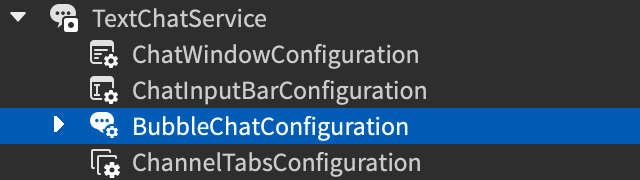
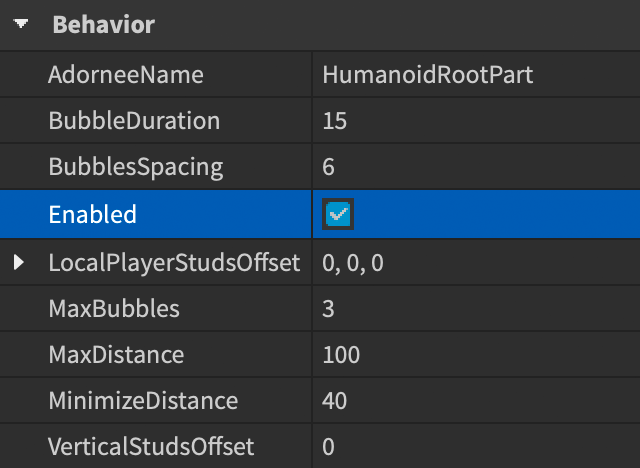
在 屬性 窗口中,勾選 BubbleChatConfiguration.Enabled複選框。

泡泡自訂
啟用泡泡聊天後,您可以自訂聊天泡泡的外觀和行為,以符合遊戲的主題。使用 BubbleChatConfiguration 的 屬性 窗口進行 基本 更改,如文本顏色和間距,或實作 進階 自訂以調整泡泡背景圖片和其他視覺效果。

另選擇在 StarterPlayerScripts 中添加一個包含您所有自訂設置的 LocalScript。這樣引擎可以在運行時應用您的自訂設置,覆蓋 Studio 中的設定。這對於在使用者觸發某些事件或條件時為聊天泡泡添加特效很有用。
基本自訂
以下表格顯示常見的泡泡聊天自訂屬性。如需完整的自訂屬性清單,請參見 BubbleChatConfiguration。
| 屬性 | 描述 | 預設值 |
|---|---|---|
| BackgroundColor3 | 泡泡的背景顏色,類型為 Color3。 | [250, 250, 250] |
| FontFace | 泡泡文本的 Font。 | BuilderSansMedium |
| TextColor3 | 泡泡文本的顏色,類型為 Color3。 | [57, 59, 61] |
| TextSize | 泡泡文本的大小。 | 16 |
進階自訂
要為您的泡泡進行進階自訂,添加表示泡泡外觀特定方面的 UI 對象作為 BubbleChatConfiguration 的子項,包括:
- ImageLabel 用於背景圖片設置。
- UIGradient 用於背景漸變設置。
- UICorner 用於泡泡的角落形狀。
- UIPadding 用於文字與泡泡邊緣之間的填充空間,相對於父級的正常大小。
添加這些對象後,您可以修改適用於聊天泡泡的這些對象的屬性,以進行進階泡泡自訂。以下例子中的 LocalScript 為泡泡添加背景圖片和尖角:
local TextChatService = game:GetService("TextChatService")

local bubbleChatConfiguration = TextChatService.BubbleChatConfiguration
bubbleChatConfiguration.TailVisible = false
bubbleChatConfiguration.TextColor3 = Color3.fromRGB(220, 50, 50)
bubbleChatConfiguration.FontFace = Font.fromEnum(Enum.Font.LuckiestGuy)

local bubbleUICorner = bubbleChatConfiguration:FindFirstChildOfClass("UICorner")
if not bubbleUICorner then
	bubbleUICorner = Instance.new("UICorner")
	bubbleUICorner.Parent = bubbleChatConfiguration
end
bubbleUICorner.CornerRadius = UDim.new(0, 0)

local bubbleUIPadding = bubbleChatConfiguration:FindFirstChildOfClass("UIPadding")
if not bubbleUIPadding then
	bubbleUIPadding = Instance.new("UIPadding")
	bubbleUIPadding.Parent = bubbleChatConfiguration
end
bubbleUIPadding.PaddingTop = UDim.new(0, 20)
bubbleUIPadding.PaddingRight = UDim.new(0, 10)
bubbleUIPadding.PaddingBottom = UDim.new(0, 15)
bubbleUIPadding.PaddingLeft = UDim.new(0, 10)

local bubbleImageLabel = bubbleChatConfiguration:FindFirstChildOfClass("ImageLabel")
if not bubbleImageLabel then
	bubbleImageLabel = Instance.new("ImageLabel")
	bubbleImageLabel.Parent = bubbleChatConfiguration
end
bubbleImageLabel.Image = "rbxassetid://109157529833093"
bubbleImageLabel.ScaleType = Enum.ScaleType.Slice
bubbleImageLabel.SliceCenter = Rect.new(40, 40, 320, 120)
bubbleImageLabel.SliceScale = 0.5
以下表格列出了可用的 GuiObject 和 外觀修飾符 子項及其有效的自訂屬性:
| 屬性 | 描述 | 預設值 |
|---|---|---|
| Image | 泡泡背景圖片的資產 ID。 | |
| ImageColor3 | 泡泡背景圖片的顏色調色,在 Color3 中。 | [255, 255, 255] |
| ImageRectOffset | 從左上角顯示的圖片區域的偏移量,單位為像素。 | (0, 0) |
| ImageRectSize | 顯示的圖片區域的大小,單位為像素。要顯示整個圖片,請將任一維度設置為 0。 | (0, 0) |
| ScaleType | 當該圖片的大小不同於泡泡的絕對大小時,用於渲染圖片的縮放類型。 | Stretch |
| SliceCenter | 如果圖片是 9 切圖,則為圖片的切片邊界。僅在您將 ScaleType 設置為 Slice 時適用。 | (0, 0, 0, 0) |
| SliceScale | 如果圖片是 9 切圖的話,則為切片邊緣的縮放比例。僅在您將 ScaleType 設置為 Slice 時適用。 | 1 |
| TileSize | 圖片的平鋪大小。僅在您將 ScaleType 設置為 Tile 時適用。 | (1, 0, 1, 0) |
每個泡泡的自訂
您可以根據特定條件單獨設計和修改聊天泡泡的行為,從而覆蓋一般設置。例如,您可以使用聊天泡泡來區分 NPC 和使用者,突出關鍵健康狀態,並對帶有預定義關鍵字的消息應用特效。
要設置每個泡泡的自訂,請添加一個客戶端 LocalScript,使用 BubbleChatMessageProperties 來覆蓋 BubbleChatConfiguration 的匹配屬性,並利用 TextChatService.OnBubbleAdded 回調來指定如何自訂每個泡泡。該回調為您提供 TextChatMessage 屬性以及裝飾物,這樣您可以根據與使用者相關的屬性、聊天文本內容、使用者角色屬性以及您想要定義的任何特殊條件來應用自訂。
以下基本自訂屬性可用於每個泡泡的自訂:
| 屬性 | 描述 | 預設值 |
|---|---|---|
| BackgroundColor3 | 泡泡的背景顏色,類型為 Color3。 | (250, 250, 250) |
| BackgroundTransparency | 泡泡的背景透明度。 | 0.1 |
| FontFace | 泡泡文本的 Font。 | BuilderSansMedium |
| TextColor3 | 泡泡文本的顏色,類型為 Color3。 | [57, 59, 61] |
| TextSize | 泡泡文本的大小。 | 16 |
以下範例通過檢查聊天消息發送者是否擁有 IsVIP 屬性,為 VIP 使用者的聊天泡泡添加特殊外觀:
local TextChatService = game:GetService("TextChatService")
local Players = game:GetService("Players")

-- 新聊天泡泡被添加至遊戲時的事件處理器
TextChatService.OnBubbleAdded = function(message: TextChatMessage, adornee: Instance)
	-- 檢查聊天消息是否有與之關聯的 TextSource (發送者)
	if message.TextSource then
		-- 創建新的 BubbleChatMessageProperties 實例以自訂聊天泡泡
		local bubbleProperties = Instance.new("BubbleChatMessageProperties")

		-- 根據用戶 ID 獲取發送聊天消息的玩家
		local player = Players:GetPlayerByUserId(message.TextSource.UserId)

		if player:GetAttribute("IsVIP") then
			-- 如果玩家是 VIP,則自訂聊天泡泡屬性
			bubbleProperties.TextColor3 = Color3.fromHex("#F5CD30")
			bubbleProperties.BackgroundColor3 = Color3.fromRGB(25, 27, 29)
			bubbleProperties.FontFace = Font.fromEnum(Enum.Font.PermanentMarker)
		end
		return bubbleProperties
	end
end
所有的進階自訂選項也可以用於每個泡泡的自訂。與普通泡泡的進階自訂類似,將想要自訂的實例作為 BubbleChatMessageProperties 的子項添加。以下範例檢查聊天消息發送者的 Humanoid.Health 屬性,為健康狀態低的使用者的聊天泡泡添加特殊的漸變效果以及其他屬性:
local TextChatService = game:GetService("TextChatService")
local Players = game:GetService("Players")

-- 新聊天泡泡被添加至遊戲時的事件處理器
TextChatService.OnBubbleAdded = function(message: TextChatMessage, adornee: Instance)
	-- 檢查聊天消息是否有與之關聯的 TextSource (發送者)
	if message.TextSource then
		-- 根據用戶 ID 獲取發送聊天消息的玩家
		local player = Players:GetPlayerByUserId(message.TextSource.UserId)

		-- 找到玩家角色中的 humanoid
		local humanoid = player.Character:FindFirstChildWhichIsA("Humanoid")

		if humanoid and humanoid.Health < 25 then
			-- 創建新的 BubbleChatMessageProperties 實例以自訂聊天泡泡
			local bubbleProperties :BubbleChatMessageProperties = Instance.new("BubbleChatMessageProperties")

			-- 為低健康狀態自訂聊天泡泡屬性
			bubbleProperties.BackgroundColor3 = Color3.fromRGB(245, 245, 245)
			bubbleProperties.TextColor3 = Color3.fromRGB(234, 51, 96)
			bubbleProperties.TextSize = 20
			bubbleProperties.FontFace = Font.fromEnum(Enum.Font.DenkOne)

			-- 添加 UIGradient 以自訂漸變
			local uiGradient : UIGradient = Instance.new("UIGradient")
			uiGradient.Color = ColorSequence.new(Color3.fromRGB(110, 4, 0), Color3.fromRGB(0, 0, 0))
			uiGradient.Rotation = 90
			uiGradient.Parent = bubbleProperties

			return bubbleProperties
		end
	end
end
手動顯示泡泡
當玩家尚未發送消息時,您可能希望顯示聊天泡泡,例如對於 NPC。使用 TextChatService:DisplayBubble() 方法手動顯示聊天泡泡。
這些泡泡的自訂與玩家通過文本通道發送消息時自動顯示的泡泡的自訂相同,利用 TextChatService.OnBubbleAdded 回調。
NPC 泡泡
通過調用 TextChatService:DisplayBubble(character, message) 來顯示非玩家角色 (NPC) 的聊天泡泡,並將 NPC 角色和消息作為參數。這些泡泡可以使用 TextChatService.OnBubbleAdded 回調自訂,就像其他任何聊天泡泡一樣。
TextChatService:DisplayBubble() 只能在客戶端腳本中工作,因此請確保使用 Script,並將 RunContext 設置為 Enum.RunContext.Client,或者在適當的容器中使用 LocalScript,例如 StarterPlayerScripts。如果您將 ProximityPrompt 附加到 NPC,則顯示聊天泡泡的腳本可能如下所示:
local TextChatService = game:GetService("TextChatService")
local Workspace = game:GetService("Workspace")

local prompt = Workspace.SomeNPC.ProximityPrompt
local head = prompt.Parent:WaitForChild("Head")

prompt.Triggered:Connect(function()
	TextChatService:DisplayBubble(head, "Hello world!")
end)