玩家通常喜欢感觉自己是构建他们所处空间的一部分。SurfaceArt 开发者模块 让玩家在游戏中真正留下他们的印记。
模块使用
安装
要在游戏中使用 SurfaceArt 模块:
从 Studio 的 窗口 菜单或 主页 选项卡工具栏中,打开 工具箱 并选择 创作者商店 选项卡。
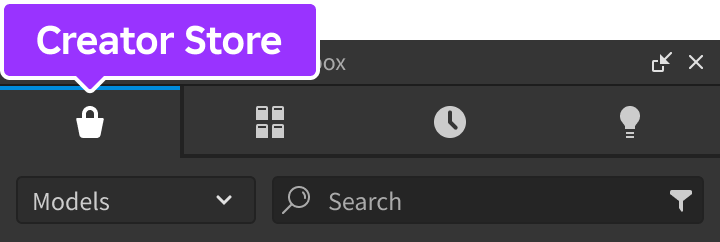
确保选择了 模型 排序,然后点击 查看所有 按钮以查看 类别。

找到并点击 包 瓦片。
找到 表面艺术 模块并点击它,或将其拖放到 3D 视图中。

在 资源管理器 窗口中,将整个 SurfaceArt 模型移动到 ReplicatedStorage 中。运行游戏时,模块将开始运行。


定位画布
该模块附带一个 SurfaceCanvas 模型,您可以在 3D 世界中定位。此模型是玩家与之交互以在其表面上放置艺术品的对象。
在模块主文件夹的 工作区 文件夹中找到 SurfaceCanvas 网格。

将其移动到顶层 工作区 层次结构中,并将其放置在所需位置。

在发布/运行测试会话时,玩家将能够通过 ProximityPrompt 与该对象交互,并在定义的表面上放置艺术品。


更改画布面
在内部,该模块使用 SurfaceGui 来显示艺术项目。要配置艺术品显示在哪个表面上:
选择 SurfaceCanvas 网格。
在 属性 窗口的底部,找到默认值为 右 的 SurfaceCanvasFace 属性。

点击该属性并输入描述 Enum.NormalId 的六个值之一。

| 属性值 | 对应的正常 ID |
|---|---|
| 前 | Enum.NormalId.Front |
| 后 | Enum.NormalId.Back |
| 右 | Enum.NormalId.Right |
| 左 | Enum.NormalId.Left |
| 上 | Enum.NormalId.Top |
| 下 | Enum.NormalId.Bottom |
使用自定义艺术资产
为了更好地符合您游戏的主题,您可以使用自己的自定义资产集,而不是默认资产。这可以通过在 ServerScriptService 中的 Script 中调用 configure 函数来完成。
local ReplicatedStorage = game:GetService("ReplicatedStorage")

local SurfaceArt = require(ReplicatedStorage.SurfaceArt)

local customAssets = {
	CustomAsset1 = {
		name = "自定义资产 1",
		assetId = "rbxassetid://7322508294",
	},
	CustomAsset2 = {
		name = "自定义资产 2",
		assetId = "rbxassetid://7322547665",
	},
}

SurfaceArt.configure({
	assets = customAssets,
})
清除所有画布
要从世界中的所有画布中移除所有现有艺术品,请从 Script 中调用 removeAllArt 函数。
local ReplicatedStorage = game:GetService("ReplicatedStorage")

local SurfaceArt = require(ReplicatedStorage.SurfaceArt)

SurfaceArt.removeAllArt()
显示自定义效果
可能会有一些情况,您希望在放置艺术品时包含额外的视觉效果。该模块在客户端公开了一个名为 artChanged 的事件,您可以连接到该事件并添加自己的逻辑。
local ReplicatedStorage = game:GetService("ReplicatedStorage")

local SurfaceArt = require(ReplicatedStorage.SurfaceArt)

local function createParticleEmitter(canvas, position)
	local attachment = Instance.new("Attachment")
	attachment.Position = canvas.CFrame:PointToObjectSpace(position)
	attachment.Axis = Vector3.new(0, 0, 1)
	attachment.SecondaryAxis = Vector3.new(1, 0, 0)
	attachment.Parent = canvas

	local particleEmitter = Instance.new("ParticleEmitter")
	particleEmitter.Speed = NumberRange.new(50)
	particleEmitter.Rate = 50
	particleEmitter.Color = ColorSequence.new(Color3.fromRGB(128, 254, 7))
	particleEmitter.SpreadAngle = Vector2.new(35, 35)
	particleEmitter.Parent = attachment

	return attachment
end

SurfaceArt.artChanged:Connect(function(canvas, spot, spotPosition, artId, ownerId)
	if artId then
		-- 显示一些闪光 3 秒
		task.spawn(function()
			local emitterAttachment = createParticleEmitter(canvas, spotPosition)
			task.wait(3)
			emitterAttachment:Destroy()
		end)
	end
end)
API 参考
类型
SurfaceArtAsset
用于画布的艺术图像由一个包含两个值的表表示。
| 键 | 描述 |
|---|---|
| name | 元数据显示名称。 |
| assetId | 要包含的图像的资产 ID。 |
函数
configure
configure(config: table)
通过 config 表中的以下键/值覆盖默认配置选项。此函数只能从 Script 中调用。
| 键 | 描述 | 默认 |
|---|---|---|
| enabled | 切换模块的功能开或关。 | true |
| assets | SurfaceArtAsset 类型的列表。 | (见 下面的代码) |
| quotaPerPlayer | 每个玩家可以放置的艺术品最大数量。 | 2 |
local ReplicatedStorage = game:GetService("ReplicatedStorage")

local SurfaceArt = require(ReplicatedStorage.SurfaceArt)

SurfaceArt.configure({
	quotaPerPlayer = 4,
	promptKeyCode = Enum.KeyCode.T,
	promptMaxActivationDistance = 8,
})
getCanvases
getCanvases(): table
返回所有标记为 SurfaceCanvas 的画布。
local ReplicatedStorage = game:GetService("ReplicatedStorage")

local SurfaceArt = require(ReplicatedStorage.SurfaceArt)

local canvases = SurfaceArt.getCanvases()
placeArt
代表玩家以编程方式放置艺术品。请注意,canvas 对象必须在服务器初始化时标记为 SurfaceCanvas。建议仅使用从 getCanvases 返回的画布。
local ReplicatedStorage = game:GetService("ReplicatedStorage")

local SurfaceArt = require(ReplicatedStorage.SurfaceArt)

local remoteEvent = ReplicatedStorage:WaitForChild("SurfaceArtRemoteEvent")

remoteEvent.OnServerEvent:Connect(function(player)
	-- 将默认艺术资产中的 Bloxy 奖放置到第一个画布上
	local canvases = SurfaceArt.getCanvases()
	SurfaceArt.placeArt(player, canvases[1], "BloxyAward")
end)
removeAllArt
removeAllArt()
从所有表面移除所有艺术作品。
local ReplicatedStorage = game:GetService("ReplicatedStorage")

local SurfaceArt = require(ReplicatedStorage.SurfaceArt)

SurfaceArt.removeAllArt()
事件
artChanged
当某个画布上的艺术作品被更改时触发。当艺术作品被移除时,artId 将为 nil。请注意,作为事件处理程序的第三个参数传递了一个 Vector3 值,以便您可以在艺术作品放置的确切位置放置 自定义效果。此事件只能在 LocalScript 中连接。
| 参数 | |
|---|---|
| canvas: BasePart | 艺术作品被更改的画布。 |
| spot: Frame | 包含艺术作品 ImageLabel 的内部 Frame。 |
| spotPosition: Vector3 | 艺术作品放置的确切位置。 |
| artId: string | 新艺术作品的资产 ID。 |
| ownerUserId: number | 放置艺术品的玩家的 UserId。 |
local ReplicatedStorage = game:GetService("ReplicatedStorage")

local SurfaceArt = require(ReplicatedStorage.SurfaceArt)

SurfaceArt.artChanged:Connect(function(canvas, spot, spotPosition, artId, ownerId)
	print("艺术放置在:", spotPosition)
	print("艺术资产 ID:", artId)
	print("艺术放置者:", ownerId)
end)
promptShown
当画布交互提示显示给玩家时触发。连接的函数接收提示显示的画布。此事件只能在 LocalScript 中连接。
| 参数 | |
|---|---|
| canvas: BasePart | 提示显示的画布。 |
local ReplicatedStorage = game:GetService("ReplicatedStorage")
local Players = game:GetService("Players")

local SurfaceArt = require(ReplicatedStorage.SurfaceArt)

SurfaceArt.promptShown:Connect(function(canvas)
	print(Players.LocalPlayer, canvas)
end)
promptHidden
当画布交互提示被隐藏时触发。连接的函数接收提示显示的画布。此事件只能在 LocalScript 中连接。
| 参数 | |
|---|---|
| canvas: BasePart | 提示显示的画布。 |
local ReplicatedStorage = game:GetService("ReplicatedStorage")
local Players = game:GetService("Players")

local SurfaceArt = require(ReplicatedStorage.SurfaceArt)

SurfaceArt.promptClosed:Connect(function(canvas)
	print(Players.LocalPlayer, canvas)
end)
selectorShown
当表面艺术选择器 UI 显示给玩家时触发。此事件只能在 LocalScript 中连接。
local ReplicatedStorage = game:GetService("ReplicatedStorage")
local Players = game:GetService("Players")

local SurfaceArt = require(ReplicatedStorage.SurfaceArt)

SurfaceArt.selectorShown:Connect(function()
	print(Players.LocalPlayer, "打开了表面艺术选择器")
end)
selectorHidden
当表面艺术选择器 UI 对玩家隐藏时触发。此事件只能在 LocalScript 中连接。
local ReplicatedStorage = game:GetService("ReplicatedStorage")
local Players = game:GetService("Players")

local SurfaceArt = require(ReplicatedStorage.SurfaceArt)

SurfaceArt.selectorHidden:Connect(function()
	print(Players.LocalPlayer, "关闭了表面艺术选择器")
end)