在游戏中定位朋友可能会很具挑战性。FriendsLocator 开发者模块 让玩家可以轻松找到并传送到他们在游戏中的朋友。
模块使用
安装
要在游戏中使用 FriendsLocator 模块:
从 Studio 的 窗口 菜单或 主页 选项卡工具栏中,打开 工具箱 并选择 创作者商店 选项卡。
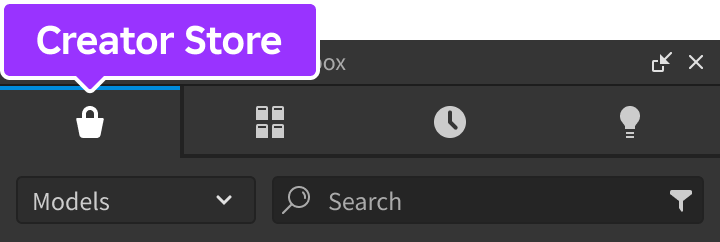
确保选择了 模型 排序,然后点击 查看所有 按钮以查看 类别。

找到并点击 包 瓦片。
找到 朋友定位器 模块并点击它,或将其拖放到 3D 视图中。

在 资源管理器 窗口中,将整个 FriendsLocator 模型移动到 ReplicatedStorage 中。运行游戏时,模块将开始运行。


在 Studio 中测试
要在 Studio 中测试模块,FriendsLocator 模块必须在多客户端模拟中运行,因为在单人游戏测试中不会有朋友。
在 StarterPlayerScripts 中,创建一个新的 LocalScript 并将其重命名为 ConfigureFriendsLocator。

将以下代码粘贴到新的 ConfigureFriendsLocator 脚本中。 configure 函数中的 showAllPlayers 设置确保在 Studio 中测试时显示所有用户的定位器,但在发布的地方不会显示。
LocalScript - ConfigureFriendsLocatorlocal RunService = game:GetService("RunService")local ReplicatedStorage = game:GetService("ReplicatedStorage")local FriendsLocator = require(ReplicatedStorage.FriendsLocator)FriendsLocator.configure({showAllPlayers = RunService:IsStudio(), -- 允许在 Studio 中调试})从 Studio 的中间层,启动一个 多客户端模拟 并创建 2 个客户端。将打开三个新的 Studio 实例;一个模拟服务器和两个模拟客户端。

进入任一 客户端 Studio 实例,移动距离另一个角色 100 个单位,您应该会看到一个 定位器图标 出现在其头顶。


连接到事件
FriendsLocator 模块公开了 事件,以便您可以在用户与定位器图标交互时引入自定义行为。
确保您已创建 在 Studio 中测试 中概述的 ConfigureFriendsLocator 脚本。
将第 8 行和第 11-13 行添加到脚本中:
LocalScript - ConfigureFriendsLocatorlocal RunService = game:GetService("RunService")local ReplicatedStorage = game:GetService("ReplicatedStorage")local FriendsLocator = require(ReplicatedStorage.FriendsLocator)FriendsLocator.configure({showAllPlayers = RunService:IsStudio(), -- 允许在 Studio 中调试teleportToFriend = false, -- 防止点击/轻触图标时传送})FriendsLocator.clicked:Connect(function(player, playerCFrame)print("您点击了", player.DisplayName, "的定位器图标")end)进行一次 多客户端测试,并点击另一个角色的定位器图标。注意您的角色不会传送到该位置,并且事件会触发以允许自定义处理图标点击。
自定义定位器 UI
如果默认样式不适合您的游戏,您可以用自己的 UI 替换默认的头像肖像 UI。

要替换默认 UI:
在 StarterGui 容器中创建一个新的 ScreenGui 实例。

创建一个名为 FriendLocator 的 Frame 实例,作为新 ScreenGui 的子项,然后添加 ImageLabels、TextLabels 等元素来设计您的自定义 UI。

完成后,禁用 父级 ScreenGui,以便模块在需要时才显示自定义定位器 UI。

- 可选如果您希望朋友的头像肖像和 DisplayName 在自定义 UI 中的某个位置显示,您可以在 FriendLocator 框架中放置以下实例。
- 一个名为 Portrait 的 ImageLabel。
- 一个名为 DisplayName 的 TextLabel。

模块将查找这些项目并分别显示朋友的头像肖像和/或显示名称。


API 参考
函数
configure
configure(config: table)
通过 config 表中的以下键/值覆盖默认配置选项。
| 键 | 描述 | 默认值 |
|---|---|---|
| alwaysOnTop | 如果为 true,则在所有内容上方显示定位器图标,防止它们被 3D 世界对象阻挡。 | true |
| showAllPlayers | 如果为 true,则显示所有玩家的位置,而不仅仅是朋友;这可以帮助验证模块在 Studio 中的功能。 | false |
| teleportToFriend | 当点击或轻触朋友的定位器图标时,将玩家角色传送到朋友的位置。 | true |
| thresholdDistance | 定位器图标出现的相机距离阈值;距离小于此距离的朋友将不显示图标。 | 100 |
| maxLocators | 任何给定时间显示的最大定位器图标数量。 | 10 |
local ReplicatedStorage = game:GetService("ReplicatedStorage")

local FriendsLocator = require(ReplicatedStorage.FriendsLocator)

FriendsLocator.configure({
	alwaysOnTop = true,
	showAllPlayers = false,
	teleportToFriend = true,
	thresholdDistance = 100,
	maxLocators = 10
})
事件
clicked
当本地玩家点击/激活定位器图标时触发。此事件只能在 LocalScript 中连接。
| 参数 | |
|---|---|
| player: Player | 定位器图标所属的玩家。 |
| playerCFrame: CFrame | 定位器图标所属玩家的 Humanoid.RootPart 的 CFrame。 |
local ReplicatedStorage = game:GetService("ReplicatedStorage")
local Players = game:GetService("Players")
local Workspace = game:GetService("Workspace")

local FriendsLocator = require(ReplicatedStorage.FriendsLocator)

local localPlayer = Players.LocalPlayer

FriendsLocator.clicked:Connect(function(player, playerCFrame)
	-- 请求在目标位置周围进行流
	if Workspace.StreamingEnabled then
		local success, errorMessage = pcall(function()
			localPlayer:RequestStreamAroundAsync(playerCFrame.Position)
		end)
		if not success then
			print(errorMessage)
		end
	end

	print("您点击了", player.DisplayName, "的定位器图标,位置为", playerCFrame.Position)
end)
visibilityChanged
当定位器图标在本地玩家的屏幕上显示/隐藏时触发。此事件只能在 LocalScript 中连接。
| 参数 | |
|---|---|
| player: Player | 定位器图标所属的 Player 对象。 |
| playerCFrame: CFrame | 定位器图标所属玩家的 Humanoid.RootPart 的 CFrame。 |
| isVisible: boolean | 定位器图标当前是否在本地玩家的屏幕上可见。请注意,如果 alwaysOnTop 为 false 且定位器在 3D 世界中的对象后面渲染,这仍然会是 true。 |
local ReplicatedStorage = game:GetService("ReplicatedStorage")

local FriendsLocator = require(ReplicatedStorage.FriendsLocator)

FriendsLocator.visibilityChanged:Connect(function(player, playerCFrame, isVisible)
	print("定位器图标的可见性为", player.DisplayName, ":", isVisible)
end)