表情符號是任何社交體驗的核心組成部分。 EmoteBar 開發者模塊旨在為玩家提供一種可及、可自定義的方式來促進有意義的社交互動。
模塊使用
安裝
要在體驗中使用 EmoteBar 模塊:
從工作室的 Window 菜單或 Home 標籤工具欄中,打開 工具箱 並選擇 創作者商店 標籤。
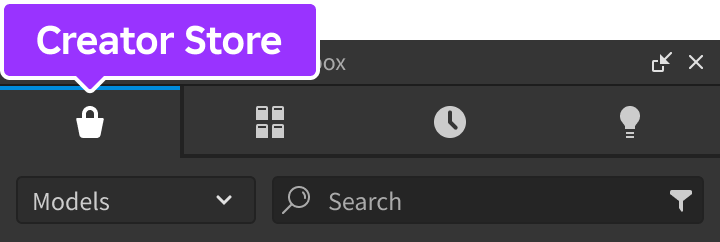
確保選擇了 模型 排序,然後點擊 查看所有 按鈕以顯示 類別。

找到並點擊 包 磁貼。
找到 Emote Bar 模塊並點擊,或將其拖放到 3D 視圖中。

在 資源管理器 窗口中,將整個 EmoteBar 模型移動到 ReplicatedStorage 中。在運行體驗時,模塊將開始運行。


配置
該模塊預配置有 7 個表情符號,並且可以通過您的自定義表情符號和顯示選項輕鬆自定義。此外,如果玩家擁有來自先前 Roblox 活動的任何表情符號,例如 Lil Nas X、Royal Blood 或 Twenty One Pilots,則這些表情符號將自動添加到可用表情符號的列表中。
在 ServerScriptService 中,創建一個新的 Script 並將其重命名為 ConfigureEmotes。

將以下代碼粘貼到新的 ConfigureEmotes 腳本中。 useDefaultEmotes 設置為 false 會覆蓋默認表情符號,並允許您通過 setEmotes 函數定義自定義表情符號。
Script - ConfigureEmoteslocal ReplicatedStorage = game:GetService("ReplicatedStorage")local EmoteBar = require(ReplicatedStorage.EmoteBar)EmoteBar.configureServer({useDefaultEmotes = false,})EmoteBar.setEmotes({{name = "Hello",animation = "rbxassetid://3344650532",image = "rbxassetid://7719817462",defaultTempo = 1,},{name = "Applaud",animation = "rbxassetid://5915693819",image = "rbxassetid://7720292217",defaultTempo = 2,},})

巨型表情符號
當多個玩家在同一區域同時執行相同的表情符號時,形成了一個 巨型表情符號。隨著越來越多的玩家加入,巨型表情符號變得更大。當玩家停止執行該表情符號時,巨型表情符號會變小,直到最終消失。

速度
表情符號的 速度 是按下一次按鈕時播放的速度。表情符號的默認速度由其 defaultTempo 決定。通過更快或更慢地點擊按鈕,可以增加或減少表情符號的速度。
API 參考
類型
表情符號
每個表情符號由具有以下鍵值對的字典表示:
| 鍵 | 類型 | 描述 |
|---|---|---|
| name | string | 表情符號名稱,例如 "Shrug"。 |
| animation | string | 表情符號動畫的資產 ID。 |
| image | string | 表情符號在 GUI 中的圖像的資產 ID。 |
| defaultTempo | number | 播放表情符號動畫的默認速度因子。例如,速度為 2 將以正常速度的兩倍播放動畫。必須大於 0。 |
| isLocked | bool | 表情符號是否被“鎖定”以防止激活。 |
枚舉
EmoteBar.GuiType
| 名稱 | 摘要 |
|---|---|
| EmoteBar | 默認形式,表情符號在屏幕底部的條中顯示,被分成單獨的“頁面”。 |
| EmoteWheel | 變體,當玩家點擊或輕點其角色時,表情符號以環形顯示。 |
LocalScript
函數
configureServer
configureServer(config: table)
通過 config 表中的以下鍵/值覆蓋默認的服務器端配置選項。該函數只能從 Script 調用,並且更改將自動複製到所有客戶端。
| 鍵 | 描述 | 默認 |
|---|---|---|
| useDefaultEmotes | 是否包含提供的默認表情符號。 | true |
| useMegaEmotes | 啟用或禁用 巨型表情符號 特性。 | true |
| emoteMinPlayers | 執行相同表情符號以貢獻於巨型表情符號的最小玩家數量。 | 3 |
| emoteMaxPlayers | 執行相同表情符號以貢獻於巨型表情符號的最大玩家數量。 | 50 |
| playParticles | 啟用或禁用玩家執行的表情符號在其頭上呈現為漂浮粒子。 | true |
| sendContributingEmotes | 啟用或禁用發送小表情符號圖標來貢獻於巨型表情符號。 | true |
Script
configureClient
configureClient(config: table)
通過 config 表中的以下鍵/值覆蓋默認的客戶端配置選項。該函數只能從 LocalScript 調用。根據 guiType 的值,標註選項中選項也將適用。
| 鍵 | 描述 | 默認 |
|---|---|---|
| guiType | 控制 GUI 顯示表情符號的形式 (EmoteBar.GuiType)。 | EmoteBar |
| useTempo | 啟用或禁用 速度 功能,使用戶能夠通過反覆激活相同的表情符號來控制其播放速度的快慢。 | true |
| tempoActivationWindow | 用戶在連續激活表情符號之間的時間間隔,以便將其計入速度的秒數。 | 3 |
| lockedImage | 顯示在鎖定表情符號上方的圖像。 | "rbxassetid://6905802778" |
LocalScript - 表情符號條
LocalScript - 表情符號輪
setEmotes
setEmotes(emotes: table)
設置要使用的自定義表情符號。如果 useDefaultEmotes 為 true,則這些將添加到默認值中;如果 useDefaultEmotes 為 false,則將替換默認值。該函數只能從 Script 調用,並且更改將自動複製到所有客戶端。
請參見 Emote 用於傳遞給此函數的每個表情符號的結構。
Script - ConfigureEmotes
setGuiVisibility
setGuiVisibility(visible: boolean)
顯示或隱藏表情符號 GUI。該函數只能從特定客戶端的 LocalScript 調用。
LocalScript
getEmote
通過名稱獲取 Emote。如果找不到表情符號,則返回 nil。該函數只能從特定客戶端的 LocalScript 調用。
LocalScript
playEmote
playEmote(emote: Emote)
播放給定的 Emote 並在服務器上觸發 emotePlayed 事件(如果已連接)。該函數只能從特定客戶端的 LocalScript 調用。
LocalScript
lockEmote
lockEmote(emoteName: string)
鎖定具有給定名稱的 Emote。該函數只能從客戶端的 LocalScript 調用。
LocalScript
unlockEmote
unlockEmote(emoteName: string)
解鎖具有給定名稱的 Emote。該函數只能從客戶端的 LocalScript 調用。
LocalScript
事件
emotePlayed
當任何客戶端播放表情符號時觸發。該事件只能在 LocalScript 中連接。
LocalScript
local ReplicatedStorage = game:GetService("ReplicatedStorage")
local EmoteBar = require(ReplicatedStorage.EmoteBar)
EmoteBar.emotePlayed:Connect(function(player, emote)
print(player.Name, "played", emote.name)
end)
lockedEmoteActivated
當客戶端單擊鎖定的表情符號時觸發。該事件只能在 LocalScript 中連接。
| 參數 | |
|---|---|
| emote: Emote | 被激活的鎖定表情符號。 |
LocalScript
local ReplicatedStorage = game:GetService("ReplicatedStorage")
local Players = game:GetService("Players")
local EmoteBar = require(ReplicatedStorage.EmoteBar)
EmoteBar.lockedEmoteActivated:Connect(function(emote)
print(Players.LocalPlayer, "clicked", emote.name)
end)