ProceduralModels are a type of parameter-driven Model that let you build and generate 3D objects using code. Instead of manually editing a model's content, you define its structure through a generator module and a set of attributes. When those attributes change, or when the model is resized, the generator automatically runs to update the model.
Procedural models make it easier to:
- Adjust models non-destructively by changing parameters instead of rebuilding them. For example, changing the StepSize value on a spiral staircase automatically regenerates the staircase with the updated number of steps.
- Automatically integrate with existing Studio systems like undo/redo, Team Create, and dragger tools by implementing a single OnGenerate function.
- Keep performance high, with models behaving like standard objects until their parameters change.
- Generate content both at edit time and at runtime, using the same system in Studio and in-game.
- Share parametized models on the Creator Store, making assets more flexible and customizable.
Insert procedural models
You can add procedural models to your game in the following ways:
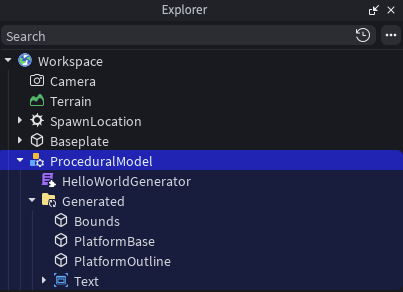
Manually insert a ProceduralModel object into the Workspace. This option includes a template generator ModuleScript to help you get started.
Generate a procedural model using Assistant or the Roblox Studio MCP server.
Insert a procedural model from the Creator Store to use or customize an existing model.

To customize how procedural models are generated, you can define your own generator modules.
OnGenerate function
The OnGenerate function is at the core of every ProceduralModel in the form of OnGenerate(params, targetContainer).
This developer-defined function is responsible for generating the model's contents based on the provided parameters and writing the results into the given container.
OnGenerate has two primary responsibilities:
- Process the input parameters to determine the model's structure
- Write the generated results according to that structure into the provided targetContainer
The following sections describe:
- When and how the engine invokes OnGenerate
- How the engine processes the contents written to the targetContainer
Generator modules
The OnGenerate function is defined inside a ModuleScript known as a generator module. The ProceduralModel identifies which generator module to use through its Generator property.
Generator modules are standard Luau modules, but are required directly by the engine as part of the generation process. They follow a defined structure and return a table with standardized fields.
local MyGenerator = {}

MyGenerator.Attributes = {
    DoSomething = true,
    AmountOfSomething = 137,
}

type Params = {
    Size: Vector3,
    Attributes: typeof(MyGenerator.Attributes),
    Pause: (self: any) -> (),
}
function MyGenerator.OnGenerate(params: Params, targetContainer: GeneratedFolder)

end

return MyGenerator
The standardized fields include:
- Attributes: A map that defines parameter names and their default values.
- OnGenerate: The function that receives a params table and a targetContainer.
The params table inside OnGenerate includes:
- Attributes: A table that contains either the module-defined attributes or all model attributes if none are specified.
- Size: A parameter that reflects the model's dimensions at a scale of one.
- Pause: A method that allows generation to yield efficiently during complex generation tasks.
The OnGenerate function should generate content around the origin in the targetContainer. It should never directly modify the main DataModel hierarchy.
Parameters
Parameters are the inputs that control generation. These include the built-in Size property of ProceduralModel, as well as custom attributes specified in the generator module. These explicit parameters are passed directly to OnGenerate. Implicit parameters, such as the module's source code or sandboxing status, also trigger regeneration when changed but are not passed to OnGenerate.
The full set of parameters includes:
- Explicit:
- Size: Defines the region around the origin where content is generated.
- Attributes: A map containing current input attribute values.
- Implicit:
- Generator: The module that supplies the generation logic.
- Source code: Changes to the generator module's Luau code.
- Sandboxing: Changes to the generator module's sandboxing status.
Regeneration behavior
To maintain performance and simplify API interactions, OnGenerate is not called immediately when parameters change. Instead, the ProceduralModel is marked as dirty, indicating that regeneration is pending. This pending regeneration typically occurs later in the same frame.
If regeneration fails, the dirty state is cleared until another parameter change occurs. If a place is saved while the model is dirty, the state persists and the model is added to the generation queue the next time the game loads.
Execution process
When processing time is available, the engine regenerates dirty models by executing the following steps:
- Requires the generator module, yielding if necessary.
- Starts a new thread for the generation process.
- Builds the parameter table, normalizing the Size by the model's current scale.
- Applies default attribute values to any missing attributes.
- Initializes a temporary GeneratedFolder as the targetContainer.
- Invokes OnGenerate.
- After OnGenerate returns:
- If successful, migrates the results in the targetContainer to the ProceduralModel.
- If generation fails, uses a failure placeholder instead.
If parameters change again while a generation thread is yielded, the outstanding generation is cancelled and restarted with the updated parameters.
Generation results
Placing generated results into the model involves the following steps:
- Terminates any child threads leaked during generation.
- Positions the results using PivotTo.
- If the model's Scale is not 1, uses ScaleTo to undo the size normalization.
- Parents the results to the model's GeneratedFolder.
- If the generator module is sandboxed, ensures the ModuleScripts in the result don't exceed the generator module capabilities.
- Populates any missing attributes on the model with their default values.
- Clears the model's dirty state.
Generation details
In addition to the core generation flow, the following details describe behaviors and considerations that affect how ProceduralModel generation works.
Sizing
Because of the scale normalization applied during generation, ProceduralModel supports multiple sizing workflows:
- Changing the Size property regenerates the model with new content.
- Changing the Scale uniformly scales the existing results using ScaleTo.

Timeouts
As a failsafe, a generator module that performs too much work without yielding is terminated. If generation hits a "Script Timeout" error, add additional calls to parameters:Pause() to allow the engine to defer remaining work to a later frame.
Calling parameters:Pause() is very inexpensive and typically returns immediately during normal generator execution, so it can be called liberally at the start of loops without impacting performance.
Undo history
Generated results are grouped with the parameter change that triggered them using undo waypoint overrides. If multiple parameter changes occur in a single frame, the results are associated with the most recent waypoint.
Sandboxing
ProceduralModel supports sandboxing. All third-party procedural models you insert from the Creator Store are sandboxed by default to help prevent unintended changes to your game.
Generation code runs in the context of the generator module and uses that module's sandboxing status. These settings aren't visible by default. To view or modify them, set Workspace.SandboxedInstanceMode = Experimental. This exposes the Sandboxed and Capabilities properties on the ModuleScript.
A sandboxed generator module typically requires at least the following capabilities:
- RunServerScript (to execute the module)
- CreateInstances
- Basic
Sandboxing for the ProceduralModel and its generator module are independent of each other. When applied to the generator module, sandboxing does not affect normal runtime scripts within the ProceduralModel. This lets you keep edit-time generation tightly restricted without impacting in-game behavior.
Nesting
ProceduralModels can generate other ProceduralModels. When this happens, the engine processes the hierarchy top-down within the same generation step when possible, with more deeply-nested models generated last.
Limitations
- Generation is not supported within Actor instances.
- Models can't be converted into packages.
- Joints created when using draggers with Joint Surfaces enabled are not preserved across ProceduralModel regenerations.