寻路是沿着逻辑路径移动角色或物体(代理)以绕过障碍物到达目的地的过程,选项上可以避免危险材料或定义区域。
导航可视化
为了帮助寻路布局和调试,Studio可以渲染导航网格和修饰符标签。要启用它们,请在3D视口的右上角的可视化选项小部件中切换打开导航 网格和寻路 修饰符。

启用导航网格后,彩色区域显示角色可能行走或游泳的地方。小箭头指示角色将尝试通过跳跃到达的区域。

实现
虽然可以通过PathfindingService及其相关方法如CreatePath()以多种方式实现寻路,但本节使用以下寻路脚本来处理玩家的角色。
在阅读时进行测试:
将以下代码复制到LocalScript中,放置在StarterCharacterScripts内,或获取此包并将其放入StarterCharacterScripts中。
PlayerPathFollow (LocalScript in StarterCharacterScripts)local PathfindingService = game:GetService("PathfindingService")local Players = game:GetService("Players")local RunService = game:GetService("RunService")local DESTINATION = Vector3.new(20, 0.5, 20)local GROUND_WAIT = 0.01local VELOCITY_MULTIPLIER = 0.0625local path = PathfindingService:CreatePath({AgentCanClimb = true,Costs = {Water = 20}})local character = script.Parentlocal humanoid = character:WaitForChild("Humanoid")local waypointslocal nextWaypointIndexlocal blockedConnectionlocal currentWaypointReachedConnectionlocal currentWaypointPlaneNormal = Vector3.zerolocal currentWaypointPlaneDistance = 0local pathfinderWorking = falselocal function disconnectCurrentWaypointReachedConnection()if not currentWaypointReachedConnection then return endcurrentWaypointReachedConnection:Disconnect()currentWaypointReachedConnection = nilendlocal function isCurrentWaypointReached()if humanoid.FloorMaterial == Enum.Material.Air thenreturn falseendlocal reached = falseif currentWaypointPlaneNormal ~= Vector3.zero then-- 计算从人形到目标平面的距离local dist = currentWaypointPlaneNormal:Dot(humanoid.RootPart.Position) - currentWaypointPlaneDistance-- 计算人形速度朝向平面的分量local velocity = -currentWaypointPlaneNormal:Dot(humanoid.RootPart.Velocity)-- 根据人形速度计算目标平面的阈值local threshold = math.max(1.0, VELOCITY_MULTIPLIER * velocity)-- 如果距离平面前方小于阈值,则认为到达了路标reached = dist < thresholdelsereached = trueendif reached thencurrentWaypointPlaneNormal = Vector3.zerocurrentWaypointPlaneDistance = 0moveToNextWaypoint()endendlocal function calculateNextWaypointApproach()nextWaypointIndex += 1if nextWaypointIndex > #waypoints thenreturn falseendlocal currentWaypoint = waypoints[nextWaypointIndex - 1]local nextWaypoint = waypoints[nextWaypointIndex]-- 从下一个路标到当前路标构建目标平面currentWaypointPlaneNormal = currentWaypoint.Position - nextWaypoint.Position-- 当不向上爬时,设置法线垂直于Y平面if nextWaypoint.Label ~= "Climb" thencurrentWaypointPlaneNormal = Vector3.new(currentWaypointPlaneNormal.X, 0, currentWaypointPlaneNormal.Z)endif currentWaypointPlaneNormal.Magnitude > 0.000001 thencurrentWaypointPlaneNormal = currentWaypointPlaneNormal.UnitcurrentWaypointPlaneDistance = currentWaypointPlaneNormal:Dot(nextWaypoint.Position)endreturn trueendlocal function resetWaypointData()humanoid:Move(Vector3.zero)currentWaypointPlaneNormal = Vector3.zerocurrentWaypointPlaneDistance = 0disconnectCurrentWaypointReachedConnection()pathfinderWorking = falseendlocal function waitForGround()while humanoid.FloorMaterial == Enum.Material.Air dotask.wait(GROUND_WAIT)endendfunction moveToNextWaypoint()if calculateNextWaypointApproach() thendisconnectCurrentWaypointReachedConnection()currentWaypointReachedConnection = RunService.Heartbeat:Connect(isCurrentWaypointReached)local nextWaypointPosition = waypoints[nextWaypointIndex].Positionlocal nextWaypointAction = waypoints[nextWaypointIndex].Actionhumanoid:Move(nextWaypointPosition - humanoid.RootPart.Position)if waypoints[nextWaypointIndex + 1] and waypoints[nextWaypointIndex + 1].Label == "UseBoat" thennextWaypointIndex += 1-- 调用您自己的自定义函数使代理使用船只elseif nextWaypointAction == Enum.PathWaypointAction.Jump thenhumanoid:ChangeState(Enum.HumanoidStateType.Jumping)while humanoid.FloorMaterial ~= Enum.Material.Air dotask.wait(GROUND_WAIT)endhumanoid:Move(nextWaypointPosition - humanoid.RootPart.Position)endelseresetWaypointData()endendlocal function findStartingPoint(waypoints)nextWaypointIndex = 1while nextWaypointIndex + 1 <= #waypoints dolocal dist = waypoints[nextWaypointIndex + 1].Position - humanoid.RootPart.Positiondist = Vector3.new(dist.X, 0, dist.Z)if dist.magnitude >= 2 thenreturnendnextWaypointIndex += 1endendlocal function followPath()-- 计算路径pathfinderWorking = truewaitForGround()local success, errorMessage = pcall(function()path:ComputeAsync(character.PrimaryPart.Position, DESTINATION)end)if not success or path.Status ~= Enum.PathStatus.Success thenwarn("路径未计算!", errorMessage)returnend-- 获取路径路标waypoints = path:GetWaypoints()-- 检测路径是否被阻塞blockedConnection = path.Blocked:Connect(function(blockedWaypointIndex)-- 检查障碍物是否在路径的更远处if blockedWaypointIndex >= nextWaypointIndex then-- 停止检测路径阻塞,直到路径重新计算blockedConnection:Disconnect()resetWaypointData()-- 调用函数重新计算新路径followPath()endend)findStartingPoint(waypoints)moveToNextWaypoint()endfollowPath()继续阅读以下部分以了解路径计算和角色移动。


路径创建
寻路通过PathfindingService及其CreatePath()方法启动(
| 键 | 描述 | 类型 | 默认 |
|---|---|---|---|
| AgentRadius | 代理半径,以stud为单位。用于确定与障碍物的最小间隔。 | 整数 | 2 |
| AgentHeight | 代理高度,以stud为单位。小于此值的空隙,如楼梯下方的空间,将被标记为不可通行。 | 整数 | 5 |
| AgentCanJump | 确定在寻路过程中是否允许跳跃。 | 布尔值 | true |
| AgentCanClimb | 确定在寻路过程中是否允许攀爬TrussParts。可攀爬的路径有一个名为Climb的Label,可攀爬路径的成本默认为1。 | 布尔值 | false |
| WaypointSpacing | 路径中中间路标之间的间距。如果设置为math.huge,则不会有中间路标。 | 数字 | 4 |
| Costs | 材料或定义的PathfindingModifiers及其通行成本的表。用于使代理更倾向于某些材料/区域而非其他材料。有关详细信息,请参见修饰符。 | 表 | nil |
路径计算
在您使用CreatePath()创建有效路径后,必须通过调用Path:ComputeAsync()并为起点和目标提供Vector3来计算它(

一旦Path被计算,它将包含一系列从起点到终点的路标。这些点可以通过Path:GetWaypoints()方法收集(

路径移动
每个PathWaypoint由Position(Vector3)和Action(PathWaypointAction)组成。要移动包含Humanoid的角色,如典型的Roblox角色,最佳方法是从路标到路标调用Humanoid:Move()并使用脚本的isCurrentWaypointReached()回调(
被阻塞的路径
许多Roblox世界是动态的;部件可能移动或掉落,地板可能坍塌。这可能会阻塞计算路径并阻止角色到达其目的地。为了解决这个问题,您可以连接Path.Blocked事件并重新计算绕过阻塞物的路径(
寻路修饰符
默认情况下,Path:ComputeAsync()返回起点和目标之间的最短路径,唯一的例外是它尝试避免跳跃。在某些情况下,这看起来不自然;例如,路径可能会通过沼泽水而不是绕过它,仅仅因为通过水的路径在几何上更短。

为了进一步优化寻路,您可以实现寻路修饰符,以计算跨越各种材料的更智能路径,绕过定义的区域,或忽略障碍物。
材料成本
在处理Terrain和BasePart材料时,您可以在CreatePath()中包含一个Costs表,以使某些材料比其他材料更易于通行。所有材料的默认成本为1,任何材料都可以通过将其值设置为math.huge来定义为不可通行。
Costs表中的键应为字符串名称,表示Enum.Material名称,例如Water表示Enum.Material.Water或CrackedLava表示Enum.Material.CrackedLava。
local PathfindingService = game:GetService("PathfindingService")
local Players = game:GetService("Players")
local RunService = game:GetService("RunService")

local DESTINATION = Vector3.new(20, 0.5, 20)
local GROUND_WAIT = 0.01
local VELOCITY_MULTIPLIER = 0.0625

local path = PathfindingService:CreatePath({
	AgentCanClimb = true,
	Costs = {
		Water = 20, CrackedLava = 100, Slate = 20
	}
})配置区域
在某些情况下,材料偏好不足以满足需求。例如,您可能希望角色避免定义的区域,无论脚下的材料如何。这可以通过将PathfindingModifier对象添加到一个部件来实现。
创建一个围绕该区域的Anchored部件,并将其CanCollide属性设置为false。

在该部件上插入一个PathfindingModifier实例,找到其Label属性,并分配一个有意义的名称,如DangerZone。
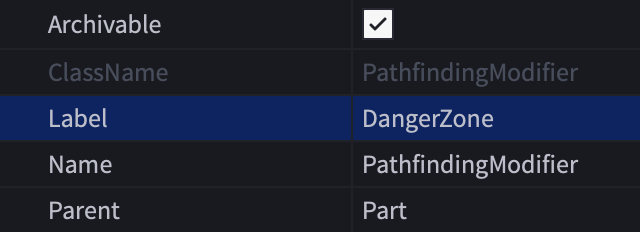
在CreatePath()的Costs表中包含一个匹配的DangerZone键和相关的数值。通过将其值设置为math.huge,可以将修饰符定义为不可通行。
PlayerPathFollow (LocalScript)local PathfindingService = game:GetService("PathfindingService")local Players = game:GetService("Players")local RunService = game:GetService("RunService")local DESTINATION = Vector3.new(20, 0.5, 20)local GROUND_WAIT = 0.01local VELOCITY_MULTIPLIER = 0.0625local path = PathfindingService:CreatePath({AgentCanClimb = true,Costs = {DangerZone = math.huge, Water = 20, CrackedLava = 20, Slate = 20}})


忽略障碍物
在某些情况下,穿过实心障碍物进行寻路是有用的,就好像它们不存在一样。这使您能够计算通过特定物理阻挡物的路径,而不是计算直接失败。
创建一个围绕对象的Anchored部件,并将其CanCollide属性设置为false。

在该部件上插入一个PathfindingModifier实例,并启用其PassThrough属性。
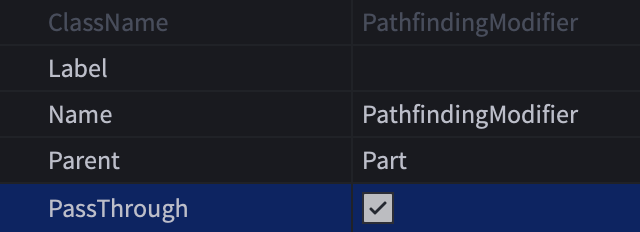
现在,当从僵尸NPC到玩家角色计算路径时,路径会延伸到门之外,您可以提示僵尸穿过它。即使僵尸无法打开门,它也会表现得好像“听到”门后面的角色。


寻路链接
有时需要在无法正常穿越的空间中找到路径,例如跨越深渊,并执行自定义操作以到达下一个路标。这可以通过PathfindingLink对象实现。
使用上面的示例,您可以让代理使用船只。

要使用此示例创建PathfindingLink:
创建两个Attachments,一个在船的座位上,另一个在船的着陆点附近。

将其Label属性分配一个有意义的名称,如UseBoat。此名称在寻路脚本中用作标志,以在代理到达起始链接点时触发自定义操作。
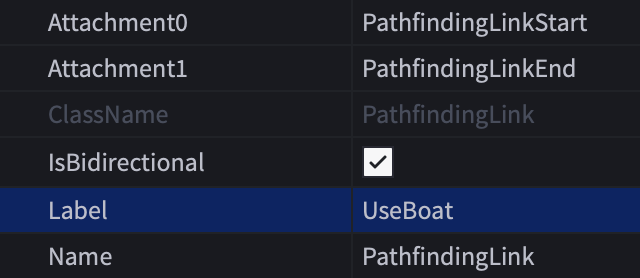
在CreatePath()中包含一个Costs表,其中包含Water键和一个与Label属性名称匹配的自定义键。将自定义键的值设置为低于Water的值。
PlayerPathFollow (LocalScript)local PathfindingService = game:GetService("PathfindingService")local Players = game:GetService("Players")local RunService = game:GetService("RunService")local DESTINATION = Vector3.new(20, 0.5, 20)local GROUND_WAIT = 0.01local VELOCITY_MULTIPLIER = 0.0625local path = PathfindingService:CreatePath({AgentCanClimb = true,Costs = {UseBoat = 2, Water = 20}})在moveToNextWaypoint()函数中(
第93–114行),可以使用对Label修饰符名称的自定义检查来执行与Humanoid:Move()不同的操作;在这种情况下,您可能会调用一个函数来让代理坐在船上,推动船穿过水,在船的着陆点让代理下船,然后继续代理的路径到达最终目的地。


流媒体兼容性
游戏中的实例流媒体是一个强大的功能,可以在玩家角色在世界中移动时动态加载和卸载3D内容。当他们探索3D空间时,新的子集会流式传输到他们的设备,而一些现有的子集可能会流出。
考虑以下在启用流媒体的游戏中使用PathfindingService的最佳实践:
流媒体可以在角色沿路径移动时阻塞或解除阻塞给定路径。例如,当角色穿过森林时,树木可能会在他们前方的某处流入并阻碍路径。为了使寻路与流媒体无缝工作,强烈建议您使用处理被阻塞路径技术,并在必要时重新计算路径。
寻路中的常见方法是使用现有对象的坐标进行计算,例如将路径目标设置为世界中现有TreasureChest模型的位置。这种方法与服务器端的Scripts完全兼容,因为服务器始终对世界有全面的视图,但在客户端运行的LocalScripts和ModuleScripts如果尝试计算到未流入的对象的路径可能会失败。
为了解决此问题,请考虑将目标设置为持久模型中BasePart的位置。持久模型在玩家加入后不久加载,并且永远不会流出,因此客户端脚本可以连接到PersistentLoaded事件,并在事件触发后安全地访问模型以创建路标。
限制和失败因素
寻路引擎包括特定的限制,以确保高效处理和最佳性能。此外,寻路计算可能因各种原因而失败,如下所述。