このプロジェクトでは、条件文を使用して、タッチされたときにパートの色に応じてリーダーボードにポイントを与えたり引いたりするパートを作成します。青の場合は、プレイヤーに少しのポイントを与えます。緑の場合は、多くのポイントを与えます。最後に、赤の場合はポイントを失います。
プロジェクトの設定
ポイントを与えるパートは、ポイントが関連する任意のプロジェクトに追加できます。たとえば、プレイヤーがポイントを集めるアドベンチャーゲームなどです。
ポイント追跡
このプロジェクトをセットアップするには、ポイントを追跡するためのリーダーボードと、色を変更するパートが必要です。リーダーボード用のコードが提供されます。
ServerScriptService に新しいスクリプトを作成し、名前をLeaderboardとします。以下のコードをスクリプトにコピー&ペーストします。
--In ServerScriptService, create a script named PlayerSetup with the contents below.local Players = game:GetService("Players")local function onPlayerJoin(player)local leaderstats = Instance.new("Folder")leaderstats.Name = "leaderstats"leaderstats.Parent = player-- Example of an IntValuelocal points = Instance.new("IntValue")points.Name = "Points"points.Value = 0points.Parent = leaderstatsend-- Run onPlayerJoin when the PlayerAdded event firesPlayers.PlayerAdded:Connect(onPlayerJoin)
色変更パート
スクリプトは、パートのために3つの異なる色を循環させます。各色には、色を作成する三つの数字(赤、緑、青)のセットを含むRGB値を保存する変数があります。
PointPartという名前のパートを作成し、PointScriptという名前のスクリプトを添付します。
PointScript内で、script.Parentを使用してパートを参照します。
local pointPart = script.Parent異なる色を保存するための変数を作成します。各変数は、色値を作成するColor3.fromRGB()に設定される必要があります。
- 青(少しのポイント): (0, 0, 255)
- 緑(多くのポイント): (0, 255, 0)
- 赤(ポイントを減らす): (255, 0, 0)
local pointPart = script.Parent-- Colorslocal blue = Color3.fromRGB(0, 0, 255)local green = Color3.fromRGB(0, 255, 0)local red = Color3.fromRGB(255, 0, 0)少量のポイント、大量のポイント、そしてポイントを減らすための変数を追加します。
-- Colorslocal blue = Color3.fromRGB(0, 0, 255)local green = Color3.fromRGB(0, 255, 0)local red = Color3.fromRGB(255, 0, 0)-- Points valueslocal smallPoints = 10local largePoints = 50local losePoints = 100
プレイヤーサービスを追加
ポイントを付与するには、プレイヤーの情報にアクセスする必要があります。この情報は、Explorer内のPlayersに格納されており、キャラクターオブジェクトとは別です。ここには、リーダーボードの統計などの情報があります。
スクリプトにPlayersサービスを追加することで、これを行うことができます。Servicesは、Robloxエンジニアによって作成された事前構築された関数の追加セットであり、あなたの時間を節約します。
Playersサービスを取得します。次のように入力します。
local Players = game:GetService("Players")
-- Points valueslocal smallPoints = 10local largePoints = 50local losePoints = 100-- Services neededlocal Players = game:GetService("Players")
関数とイベント
PointsScriptには2つの関数が必要です。最初の関数はポイントを与えたり引いたりします。2番目の関数は、プレイヤーがパートに触れたかどうかを確認します。これらの関数は、その後タッチイベントに接続されます。これは、そのパートが触れられるたびに実行されます。
givePoints()という新しい関数を作成し、playerというパラメータを作ります。内部にテスト用のprint文を追加します。
local Players = game:GetService("Players")-- Gives or subtracts pointslocal function givePoints(player)print("Giving player points")endその下に、partTouched()という名前の2番目の関数を作成し、otherPartというパラメータを持たせます。
-- Gives or subtracts pointslocal function givePoints(player)print("Giving player points")end-- Checks if player touched the partlocal function partTouched(otherPart)end関数の中で、GetPlayerFromCharacter()関数を使って、他のパート変数にプレイヤーがいるかどうかを確認します。
-- Checks if player touched the partlocal function partTouched(otherPart)local player = Players:GetPlayerFromCharacter(otherPart.Parent)endプレイヤーがパートに触れた場合、このプレイヤーはプレイヤー変数に保存されます。そうでない場合、変数は空のまま残ります。以下の内容を自分で行います:
- 関数内で、プレイヤーに値があるかどうかを確認します。もしあれば、givePoints(player)を呼び出します。
- 関数の下に、partTouched()をpointPartのTouchedイベントに接続します。
-- Checks if player touched the partlocal function partTouched(otherPart)-- Gets the player if one touched the partlocal player = Players:GetPlayerFromCharacter(otherPart.Parent)if player thengivePoints(player)endendpointPart.Touched:Connect(partTouched)プロジェクトを実行します。プレイヤーがそのパートに触れると、Outputウィンドウに "Giving player points" というメッセージが表示されるはずです。
トラブルシューティングのヒント:
- game:GetService("Players")の"Players"が正しく大文字で引用符内にあることを確認してください。
- partTouched()は、pointPartのTouchedイベントに接続されている必要があります。
循環する色を作成する
色をループさせるために、スクリプトは数秒ごとにパートの色を変更するwhileループを使用します。このループの条件はtrueであり、無限に実行できることを意味します。
スクリプトの最後に、条件がtrueである新しいwhileループを作成します。これにより、ループは常に実行されます。
-- Checks if player touched the partlocal function partTouched(otherPart)-- Gets the player if one touched the partlocal player = Players:GetPlayerFromCharacter(otherPart.Parent)if player thengivePoints(player)endendpointPart.Touched:Connect(partTouched)-- Loops through colorswhile true doend自分で、pointPartを作成した色変数に変更するwhile true doループをコーディングします。色の間にtask.wait()を使用するのを忘れないでください。完了したら、あなたのコードを以下のバージョンと照らし合わせて確認してください。
-- Loops through 3 colors, waiting between each colorwhile true dopointPart.Color = bluetask.wait(3)pointPart.Color = greentask.wait(2)pointPart.Color = redtask.wait(1)endプレイテストを行い、全ての3色が途切れずにループすることを確認します。
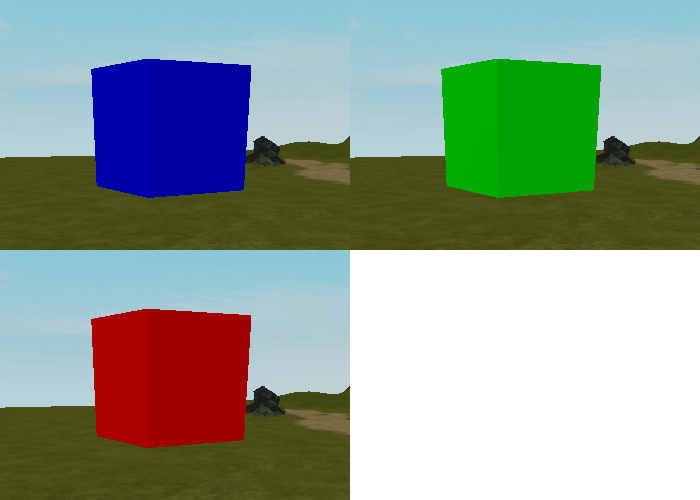

トラブルシューティングのヒント
この時点で、色のループが期待通りに機能しない場合は、以下のいずれかを試してみてください。
- whileループがスクリプトの一番下に、Touchedイベントの下にあることを確認してください。ループが一番下でない場合、スクリプトの他の部分が正しく実行されません。
- 各色をColor3.fromRGB()内で正しく記述されていることを確認してください。3つの数字は、カンマで区切られた0から255の範囲内でなければなりません(例:(255, 50, 0))。
プレイヤーにポイントを与える
プレイヤーは、パートに触れたときの現在の色に基づいてポイントが与えられます。
現在の色を見つける
プレイヤーがパートに触れるたびに、スクリプトはポイントを与えるために後で必要になるパートの現在の色を知っておく必要があります。
givePoints()を見つけます。テストメッセージをpointPartの現在の色の変数に置き換えます。この変数は、プレイヤーが獲得する(または失う)ポイントを決定します。
local function givePoints(player)local currentColor = pointPart.Colorendプレイヤーのポイントに影響を与えるために、その関数はプレイヤーのリーダーボードにアクセスする必要があります。それを格納するための変数を作成します。
local function givePoints(player)local currentColor = pointPart.Colorlocal playerStats = player:WaitForChild("leaderstats")end次に、プレイヤーのリーダーボードの子であるPoints値を取得するための変数を追加します。
local function givePoints(player)local currentColor = pointPart.Colorlocal playerStats = player:WaitForChild("leaderstats")local playerPoints = playerStats:WaitForChild("Points")end
ポイントを与えるまたは引く
次に、ifとelseifを使用して、タッチされたときのパートの色に応じてポイントを与えたり引いたりします。青は少量のポイントを提供し、緑は多くのポイントを提供し、赤はポイントを減らします。
givePoints()の中で、変数の下にif文を使用して現在の色が青かどうかを確認し、そうであればプレイヤーの現在のポイントにsmallPointsを追加します。
local function givePoints(player)local currentColor = pointPart.Colorlocal playerStats = player:WaitForChild("leaderstats")local playerPoints = playerStats:WaitForChild("Points")if currentColor == blue thenplayerPoints.Value += smallPointsendend緑をチェックするために、else if条件を追加します。もし緑であれば、プレイヤーのポイントにlargePoints変数を追加します。
if currentColor == blue thenplayerPoints.Value += smallPointselseif currentColor == green thenplayerPoints.Value += largePointsendポイントPartが青でも緑でもない場合、ポイントを引くためのelse文を使用します。
if currentColor == blue thenplayerPoints.Value += smallPointselseif currentColor == green thenplayerPoints.Value += largePointselseplayerPoints.Value -= losePointsend最後に、if文の後に破棄し、スクリプトがポイントを与え続けられないようにします。
if currentColor == blue thenplayerPoints.Value += smallPointselseif currentColor == green thenplayerPoints.Value += largePointselseplayerPoints.Value -= losePointsendpointPart:Destroy()プレイテストを行い、各色が期待通りにポイントを与えることを確認します。すべての3つの条件をテストしてください。
プレイヤーにフィードバックを与える
PointPartは機能しますが、プレイヤーはリーダーボードを見ていない限り、何かが起こったことに気づかないかもしれません。ポイントパートが破棄されたときに粒子を作成することでこれを修正します。
プレイヤーがパートを使用したときのフィードバックを追加することで、オブジェクトとのインタラクションがより満足のいくものになります。音、揺れ、または粒子などです。
粒子効果を作成する
粒子効果は、タッチされたときのパートと同じ色になります。色は変数に格納されているため、再利用が簡単です。
givePoints()の下部に、新しいParticleEmitterインスタンスを作成します。インスタンス名が正確に示されたようにスペルされていることを確認してください。
local particle = Instance.new("ParticleEmitter")endParticleEmittersは、そのColorプロパティを制御するためにカラシーケンスを使用します。新しいColorSequenceを作成し、現在の部分の色を渡します。
-- Destroy partpointPart:Destroy()-- Create particleslocal particle = Instance.new("ParticleEmitter")particle.Color = ColorSequence.new(currentColor)粒子は、それに触れたプレイヤーに親しむ必要があります。プレイヤーのCharacterモデルを取得するための変数を作成します。次に、粒子をプレイヤーの頭に親させます。
local particle = Instance.new("ParticleEmitter")particle.Color = ColorSequence.new(currentColor)local playerCharacter = player.Characterparticle.Parent = playerCharacter:WaitForChild("Head")task.wait()を1秒間使用し、次に粒子を破棄します。
local particle = Instance.new("ParticleEmitter")particle.Color = ColorSequence.new(currentColor)local playerCharacter = player.Characterparticle.Parent = playerCharacter:WaitForChild("Head")task.wait(1)particle:Destroy()ゲームをプレイテストして、各色に触れると粒子が一時的にプレイヤーについてくることを確認します。
トラブルシューティングのヒント
この時点で、粒子が期待通りに機能しない場合は、次のいずれかを試すことができます。
- 新しいインスタンスを作成する際、ParticleEmitterが正確に示された通りに、引用符内にスペルされていることを確認してください。
- 粒子を親にする際には、playerCharacterとWaitForChild()の間にスペースなしで、:を使用していることを確認してください。
完成したPointScript
以下に参照できる完成版スクリプトがあります。
local pointPart = script.Parent
--local storage = game:GetService("ServerStorage")
-- Gives some points
local blue = Color3.fromRGB(0, 0, 255)
-- Gives more points
local green = Color3.fromRGB(0, 255, 0)
-- Makes players lose points
local red = Color3.fromRGB(255, 0, 0)
-- gold given to players
local smallPoints = 10
local largePoints = 50
local losePoints = 100
local Players = game:GetService("Players")
local function givePoints(player)
local currentColor = pointPart.Color
local playerStats = player:WaitForChild("leaderstats")
local playerPoints = playerStats:WaitForChild("Points")
-- Gives player gold based on the color of the part
if currentColor == blue then
	playerPoints.Value += smallPoints
elseif currentColor == green then
	playerPoints.Value += largePoints
else
	playerPoints.Value -= losePoints
end
-- Destroy the part, wait a second, and then destroy the particle
pointPart:Destroy()
-- Creates a sparkles effect and destroys it
local playerCharacter = player.Character
local particle = Instance.new("ParticleEmitter")
particle.Color = ColorSequence.new(currentColor)
particle.Parent = playerCharacter:WaitForChild("Head")
task.wait(1)
particle:Destroy()
end
local function partTouched(otherPart)
local player = Players:GetPlayerFromCharacter(otherPart.Parent)
if player then
givePoints(player)
end
end
pointPart.Touched:Connect(partTouched)
-- Changes the color of the part based on variables. Needs to be at bottom of script.
while true do
pointPart.Color = blue
task.wait(4)
pointPart.Color = green
task.wait(3)
pointPart.Color = red
task.wait(2)
end