TextChatServiceを使用すると、バブルチャットを使ってユーザーのアバターやNPCの上にカスタマイズ可能なスピーチチャットバブルを表示できます。バブルチャットはゲームを視覚的に没入させ、ユーザーがメッセージやその発信者をコンテキストに応じて容易に特定するのに役立ちます。この機能は、ユーザーが他の人とコミュニケーションを取りながら内容に集中する必要があるゲームに特に役立ちます。
バブルチャットの有効化
ゲームでバブルチャットを有効にするには、以下の手順を実行してください。
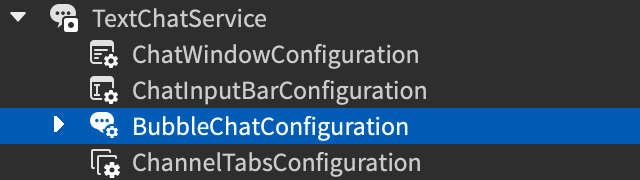
Explorerウィンドウで、TextChatServiceの下にあるBubbleChatConfigurationを選択します。
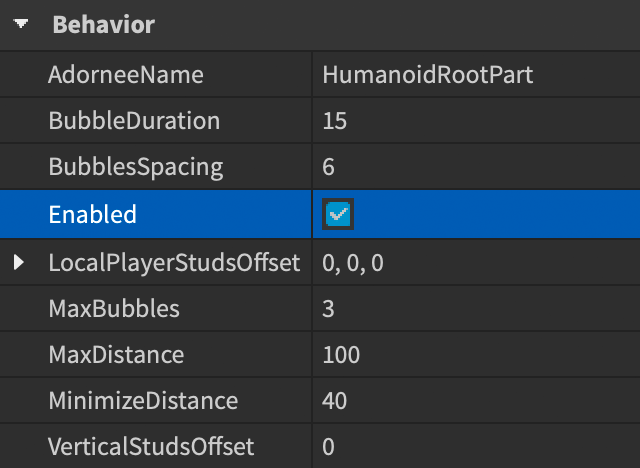
Propertiesウィンドウで、BubbleChatConfiguration.Enabledチェックボックスをオンにします。

バブルのカスタマイズ
バブルチャットを有効にしたら、あなたのゲームのテーマに合わせてチャットバブルの外観や動作をカスタマイズできます。BubbleChatConfigurationのPropertiesウィンドウを使用して、テキストの色や間隔のような基本的な変更を行ったり、バブルの背景画像やその他の視覚的調整のために高度なカスタマイズを実装したりできます。

代わりに、すべてのカスタマイズ設定を持つLocalScriptをStarterPlayerScriptsに追加します。これにより、エンジンはランタイム中にあなたのカスタマイズを適用し、スタジオ内の設定をオーバーライドします。これは、ユーザーが特定のイベントや条件をトリガーした場合にチャットバブルに特別な効果を追加するのに便利です。
基本的なカスタマイズ
以下の表は、一般的なバブルチャットカスタマイズプロパティを示しています。カスタマイズプロパティの完全なリストについては、BubbleChatConfigurationを参照してください。
| プロパティ | 説明 | デフォルト |
|---|---|---|
| BackgroundColor3 | Color3のバブルの背景色。 | [250, 250, 250] |
| FontFace | バブルテキストのFont。 | BuilderSansMedium |
| TextColor3 | Color3のバブルテキストの色。 | [57, 59, 61] |
| TextSize | バブルテキストのサイズ。 | 16 |
高度なカスタマイズ
バブルの高度なカスタマイズについては、BubbleChatConfigurationの下に、バブルの外観の特定の側面を表すUIオブジェクトを子として追加します。これには以下が含まれます。
- バックグラウンド画像設定用のImageLabel。
- バックグラウンドグラデーション設定用のUIGradient。
- バブルの角の形状用のUICorner。
- テキストとバブルの端との間のパディングスペース用のUIPadding、親の通常のサイズに対して相対的に。
これらのオブジェクトを追加した後、チャットバブルに適用可能なこれらのオブジェクトのプロパティを変更して、高度なバブルカスタマイズを行うことができます。以下のLocalScriptの例は、バブルに背景画像と鋭い角を追加します。
local TextChatService = game:GetService("TextChatService")

local bubbleChatConfiguration = TextChatService.BubbleChatConfiguration
bubbleChatConfiguration.TailVisible = false
bubbleChatConfiguration.TextColor3 = Color3.fromRGB(220, 50, 50)
bubbleChatConfiguration.FontFace = Font.fromEnum(Enum.Font.LuckiestGuy)

local bubbleUICorner = bubbleChatConfiguration:FindFirstChildOfClass("UICorner")
if not bubbleUICorner then
	bubbleUICorner = Instance.new("UICorner")
	bubbleUICorner.Parent = bubbleChatConfiguration
end
bubbleUICorner.CornerRadius = UDim.new(0, 0)

local bubbleUIPadding = bubbleChatConfiguration:FindFirstChildOfClass("UIPadding")
if not bubbleUIPadding then
	bubbleUIPadding = Instance.new("UIPadding")
	bubbleUIPadding.Parent = bubbleChatConfiguration
end
bubbleUIPadding.PaddingTop = UDim.new(0, 20)
bubbleUIPadding.PaddingRight = UDim.new(0, 10)
bubbleUIPadding.PaddingBottom = UDim.new(0, 15)
bubbleUIPadding.PaddingLeft = UDim.new(0, 10)

local bubbleImageLabel = bubbleChatConfiguration:FindFirstChildOfClass("ImageLabel")
if not bubbleImageLabel then
	bubbleImageLabel = Instance.new("ImageLabel")
	bubbleImageLabel.Parent = bubbleChatConfiguration
end
bubbleImageLabel.Image = "rbxassetid://109157529833093"
bubbleImageLabel.ScaleType = Enum.ScaleType.Slice
bubbleImageLabel.SliceCenter = Rect.new(40, 40, 320, 120)
bubbleImageLabel.SliceScale = 0.5
以下の表は、利用可能なGuiObjectと外観修正子の子要素およびそれらの有効なカスタマイズプロパティを示しています。
| プロパティ | 説明 | デフォルト |
|---|---|---|
| Image | バブルの背景画像のアセットID。 | |
| ImageColor3 | Color3のバブルの背景画像の色の tint。 | [255, 255, 255] |
| ImageRectOffset | 左上から表示される画像領域のオフセット(ピクセル)。 | (0, 0) |
| ImageRectSize | 表示される画像領域のサイズ(ピクセル)。全画像を表示するには、いずれかの次元を0に設定します。 | (0, 0) |
| ScaleType | 画像の絶対サイズがバブルのサイズと異なる場合のレンダリング時のスケールタイプ。 | Stretch |
| SliceCenter | 画像が9スライス画像である場合、画像のスライス境界。ScaleTypeをSliceとして設定した場合のみ適用されます。 | (0, 0, 0, 0) |
| SliceScale | 画像が9スライス画像である場合、スライスエッジのスケール比。ScaleTypeをSliceとして設定した場合のみ適用されます。 | 1 |
| TileSize | 画像のタイルサイズ。ScaleTypeをTileとして設定した場合のみ適用されます。 | (1, 0, 1, 0) |
バブルごとのカスタマイズ
特定の条件に基づいてチャットバブルの動作を個別にスタイルしたり、修正したりすることができます。これにより、一般的な設定をオーバーライドします。たとえば、NPCとユーザーを区別するためにチャットバブルを使用したり、重要な健康状態を強調表示したり、特定のキーワードを含むメッセージに特別な効果を適用したりできます。
バブルごとのカスタマイズを設定するには、BubbleChatMessagePropertiesを使用してクライアント側のLocalScriptを追加し、これがBubbleChatConfigurationのマッチングプロパティをオーバーライドし、TextChatService.OnBubbleAddedコールバックを使用して各バブルをどのようにカスタマイズするかを指定します。このコールバックは、TextChatMessageプロパティおよびアドーニーを提供するため、ユーザーに関連付けられた属性、チャットテキストの内容、ユーザーキャラクターのプロパティ、および定義したい特別な条件に基づいてカスタマイズを適用できます。
バブルごとのカスタマイズのために利用可能な基本的なカスタマイズプロパティは以下の通りです:
| プロパティ | 説明 | デフォルト |
|---|---|---|
| BackgroundColor3 | Color3のバブルの背景色。 | (250, 250, 250) |
| BackgroundTransparency | バブルの背景の透過性。 | 0.1 |
| FontFace | バブルテキストのFont。 | BuilderSansMedium |
| TextColor3 | Color3のバブルテキストの色。 | [57, 59, 61] |
| TextSize | バブルテキストのサイズ。 | 16 |
以下の例では、チャットメッセージの送信者がIsVIP属性を持っているかどうかをチェックすることで、VIPユーザーのチャットバブルに特別な外観を追加します:
local TextChatService = game:GetService("TextChatService")
local Players = game:GetService("Players")

-- 新しいチャットバブルがゲームに追加されたときのイベントハンドラー
TextChatService.OnBubbleAdded = function(message: TextChatMessage, adornee: Instance)
	-- チャットメッセージに関連付けられたTextSource(送信者)があるかをチェック
	if message.TextSource then
		-- チャットバブルをカスタマイズするための新しいBubbleChatMessagePropertiesインスタンスを作成
		local bubbleProperties = Instance.new("BubbleChatMessageProperties")

		-- ユーザーIDに基づいてチャットメッセージを送信したユーザーを取得
		local player = Players:GetPlayerByUserId(message.TextSource.UserId)

		if player:GetAttribute("IsVIP") then
			-- プレイヤーがVIPの場合、チャットバブルのプロパティをカスタマイズ
			bubbleProperties.TextColor3 = Color3.fromHex("#F5CD30")
			bubbleProperties.BackgroundColor3 = Color3.fromRGB(25, 27, 29)
			bubbleProperties.FontFace = Font.fromEnum(Enum.Font.PermanentMarker)
		end
		return bubbleProperties
	end
endすべての高度なカスタマイズオプションは、バブルごとのカスタマイズにも利用可能です。一般的なバブルの高度なカスタマイズと同様に、カスタマイズしたいインスタンスをBubbleChatMessagePropertiesの子として追加します。以下の例は、チャットメッセージの送信者のHumanoid.Healthプロパティをチェックすることで、低健康状態のユーザーのチャットバブルに特別なグラデーション効果と他のプロパティを追加します。
local TextChatService = game:GetService("TextChatService")
local Players = game:GetService("Players")

-- 新しいチャットバブルがゲームに追加されたときのイベントハンドラー
TextChatService.OnBubbleAdded = function(message: TextChatMessage, adornee: Instance)
	-- チャットメッセージに関連付けられたTextSource(送信者)があるかをチェック
	if message.TextSource then
		-- ユーザーIDを使用してチャットメッセージを送信したユーザーを取得
		local player = Players:GetPlayerByUserId(message.TextSource.UserId)

		-- ユーザーキャラクター内のヒューマノイドを探す
		local humanoid = player.Character:FindFirstChildWhichIsA("Humanoid")

		if humanoid and humanoid.Health < 25 then
			-- チャットバブルをカスタマイズするための新しいBubbleChatMessagePropertiesインスタンスを作成
			local bubbleProperties :BubbleChatMessageProperties = Instance.new("BubbleChatMessageProperties")

			-- 低健康状態の条件に対してチャットバブルのプロパティをカスタマイズ
			bubbleProperties.BackgroundColor3 = Color3.fromRGB(245, 245, 245)
			bubbleProperties.TextColor3 = Color3.fromRGB(234, 51, 96)
			bubbleProperties.TextSize = 20
			bubbleProperties.FontFace = Font.fromEnum(Enum.Font.DenkOne)

			-- グラデーションをカスタマイズするためのUIGradientを子として追加
			local uiGradient : UIGradient = Instance.new("UIGradient")
			uiGradient.Color = ColorSequence.new(Color3.fromRGB(110, 4, 0), Color3.fromRGB(0, 0, 0))
			uiGradient.Rotation = 90
			uiGradient.Parent = bubbleProperties

			return bubbleProperties
		end
	end
end
バブルを手動で表示する
プレイヤーがメッセージを送信していない場合、例えばNPCに対してチャットバブルを表示したい場合があります。TextChatService:DisplayBubble()メソッドを使用して、チャットバブルを手動で表示します。
これらのバブルのカスタマイズは、プレイヤーがテキストチャネルを介してメッセージを送信したときに自動的に表示されるバブルと同じです。 TextChatService.OnBubbleAddedコールバックを使用します。
NPCバブル
非プレイヤーキャラクター(NPC)のためにチャットバブルを表示するには、TextChatService:DisplayBubble(character, message)を呼び出し、NPCキャラクターとメッセージをパラメーターとして指定します。これらのバブルは、他のチャットバブルと同様にTextChatService.OnBubbleAddedコールバックを使用してカスタマイズできます。
TextChatService:DisplayBubble()はクライアント側のスクリプトでのみ動作するため、RunContextをEnum.RunContext.Clientに設定したScriptを使用するか、StarterPlayerScriptsなどの適切なコンテナ内のLocalScriptを使用してください。NPCにProximityPromptを接続する場合、チャットバブルを表示するスクリプトは次のようになります。
local TextChatService = game:GetService("TextChatService")
local Workspace = game:GetService("Workspace")

local prompt = Workspace.SomeNPC.ProximityPrompt
local head = prompt.Parent:WaitForChild("Head")

prompt.Triggered:Connect(function()
	TextChatService:DisplayBubble(head, "Hello world!")
end)