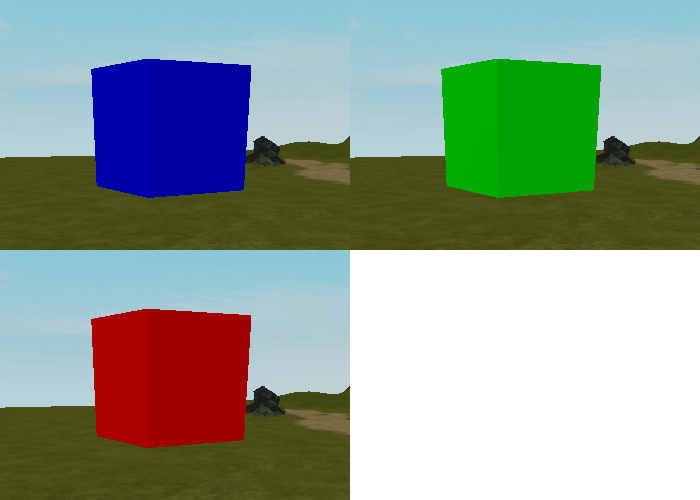
โครงการนี้จะใช้คำสั่งเงื่อนไขเพื่อสร้างส่วนที่จะมอบหรือหักคะแนนในกระดานคะแนนขึ้นอยู่กับสีของส่วนเมื่อมีการสัมผัส หากเป็นสีฟ้า จะให้ผู้เล่นคะแนนเล็กน้อย หากเป็นสีเขียว จะให้คะแนนมาก และหากเป็นสีแดง จะหักคะแนน
ตั้งค่าโครงการ
ส่วนที่ให้คะแนนสามารถเพิ่มเข้าไปในโครงการใด ๆ ที่เกี่ยวข้องกับคะแนน ตัวอย่างเช่น เกมผจญภัยที่ผู้เล่นเก็บคะแนน
การติดตามคะแนน
ในการตั้งค่าโครงการนี้ คุณจะต้องมีกระดานคะแนนเพื่อติดตามคะแนน และส่วนที่เปลี่ยนสี โค้ดสำหรับกระดานคะแนนจะถูกจัดเตรียมให้
สร้างสคริปต์ใหม่ใน ServerScriptService ชื่อว่า Leaderboard คัดลอกและวางโค้ดด้านล่างลงในสคริปต์
--ใน ServerScriptService สร้างสคริปต์ชื่อ PlayerSetup ด้วยเนื้อหาด้านล่างlocal Players = game:GetService("Players")local function onPlayerJoin(player)local leaderstats = Instance.new("Folder")leaderstats.Name = "leaderstats"leaderstats.Parent = player-- ตัวอย่างของ IntValuelocal points = Instance.new("IntValue")points.Name = "Points"points.Value = 0points.Parent = leaderstatsend-- ทำให้ onPlayerJoin ทำงานเมื่อเหตุการณ์ PlayerAdded ถูกเรียกPlayers.PlayerAdded:Connect(onPlayerJoin)
ส่วนที่เปลี่ยนสี
สคริปต์จะเปลี่ยนผ่านสามสีที่แตกต่างกันสำหรับส่วน แต่ละสีจะมีตัวแปรเพื่อเก็บค่า RGB ซึ่งเป็นประเภทข้อมูลที่ประกอบด้วยตัวเลขสามตัว (แดง, เขียว, น้ำเงิน) ที่สร้างสี
สร้างส่วนชื่อ PointPart พร้อมกับสคริปต์แนบชื่อ PointScript
ใน PointScript ใช้ script.Parent เพื่ออ้างอิงถึงส่วน
local pointPart = script.Parentสร้างตัวแปรเพื่อเก็บสีที่แตกต่างกัน ตัวแปรแต่ละตัวควรตั้งค่าเป็น Color3.fromRGB() ซึ่งสร้างค่าที่เป็นสี
- สีน้ำเงิน (คะแนนเล็กน้อย): (0, 0, 255)
- สีเขียว (คะแนนมาก): (0, 255, 0)
- สีแดง (หักคะแนน): (255, 0, 0)
local pointPart = script.Parent-- สีlocal blue = Color3.fromRGB(0, 0, 255)local green = Color3.fromRGB(0, 255, 0)local red = Color3.fromRGB(255, 0, 0)เพิ่มตัวแปรสำหรับคะแนนเล็กน้อย คะแนนมาก และอีกตัวสำหรับการหักคะแนน
-- สีlocal blue = Color3.fromRGB(0, 0, 255)local green = Color3.fromRGB(0, 255, 0)local red = Color3.fromRGB(255, 0, 0)-- ค่าคะแนนlocal smallPoints = 10local largePoints = 50local losePoints = 100
เพิ่มบริการผู้เล่น
เพื่อมอบคะแนน คุณจะต้องเข้าถึงข้อมูลของผู้เล่นซึ่งเก็บอยู่ใน Explorer ภายใต้ Players และแยกออกจากวัตถุของตัวละคร ข้อมูลนี้เป็นที่ที่สถิติกระดานคะแนนสามารถพบได้
คุณสามารถทำได้โดยการเพิ่ม Players service ลงในสคริปต์ของคุณ Services เป็นชุดของฟังก์ชันสำเร็จรูปที่สร้างโดยวิศวกร Roblox เพื่อช่วยประหยัดเวลา
รับ Players service โดยพิมพ์:
local Players = game:GetService("Players")
-- ค่าคะแนนlocal smallPoints = 10local largePoints = 50local losePoints = 100-- บริการที่จำเป็นlocal Players = game:GetService("Players")
ฟังก์ชันและเหตุการณ์
PointsScript จะต้องมีฟังก์ชันสองฟังก์ชัน ฟังก์ชันแรกจะให้และหักคะแนน ฟังก์ชันที่สองจะตรวจสอบว่าผู้เล่นสัมผัสส่วนนี้หรือไม่ ฟังก์ชันเหล่านี้จะเชื่อมโยงกับเหตุการณ์การสัมผัส ซึ่งทำงานทุกครั้งที่มีการสัมผัสส่วนนี้
สร้างฟังก์ชันใหม่ชื่อ givePoints() และพารามิเตอร์ชื่อ player ภายในให้เพิ่มคำสั่งพิมพ์เพื่อใช้สำหรับการทดสอบ
local Players = game:GetService("Players")-- มอบหรือหักคะแนนlocal function givePoints(player)print("Giving player points")endด้านล่างนั้น ให้สร้างฟังก์ชันที่สองชื่อ partTouched() โดยมีพารามิเตอร์ชื่อ otherPart
-- มอบหรือหักคะแนนlocal function givePoints(player)print("Giving player points")end-- ตรวจสอบว่าผู้เล่นสัมผัสส่วนlocal function partTouched(otherPart)endภายในฟังก์ชัน ใช้ฟังก์ชัน GetPlayerFromCharacter() เพื่อตรวจสอบว่ามีผู้เล่นอยู่ในตัวแปร otherPart หรือไม่
-- ตรวจสอบว่าผู้เล่นสัมผัสส่วนlocal function partTouched(otherPart)local player = Players:GetPlayerFromCharacter(otherPart.Parent)endหากผู้เล่นสัมผัสส่วนนี้ ข้อมูลจะถูกเก็บในตัวแปร player หากไม่ ก็จะทิ้งไว้เปล่า ตามที่คุณต้องทำ:
- ภายในฟังก์ชัน ตรวจสอบว่าผู้เล่นมีค่าอยู่หรือไม่ หากมีให้เรียกใช้ givePoints(player)
- ด้านล่างของฟังก์ชัน เชื่อมโยง partTouched() กับเหตุการณ์ Touched ของ pointPart
-- ตรวจสอบว่าผู้เล่นสัมผัสส่วนlocal function partTouched(otherPart)-- รับผู้เล่นหากมีคนสัมผัสส่วนlocal player = Players:GetPlayerFromCharacter(otherPart.Parent)if player thengivePoints(player)endendpointPart.Touched:Connect(partTouched)รัน โปรเจกต์ เมื่อใดก็ตามที่ผู้เล่นสัมผัสส่วน คุณควรเห็นข้อความในหน้าต่าง Output ว่า: "Giving player points"
เคล็ดลับการแก้ปัญหา:
- ตรวจสอบว่า "Players" ใน game:GetService("Players") ตัวพิมพ์ใหญ่ถูกต้องและอยู่ในเครื่องหมายคำพูด
- partTouched() ควรเชื่อมโยงกับเหตุการณ์ Touched ของ pointPart
สร้างสีที่วนซ้ำ
เพื่อวนผ่านสี สคริปต์จะใช้ลูป while ที่เปลี่ยนสีของส่วนทุก ๆ สองสามวินาที เงื่อนไขสำหรับลูปนี้จะถูกตั้งค่าเป็น true ซึ่งหมายถึงลูปสามารถทำงานได้ตลอดไป
ที่ส่วนท้ายของสคริปต์ สร้างลูป while ใหม่ที่เงื่อนไขเป็น true หมายความว่าลูปจะทำงานตลอดไป
-- ตรวจสอบว่าผู้เล่นสัมผัสส่วนlocal function partTouched(otherPart)-- รับผู้เล่นหากมีคนสัมผัสส่วนlocal player = Players:GetPlayerFromCharacter(otherPart.Parent)if player thengivePoints(player)endendpointPart.Touched:Connect(partTouched)-- วนผ่านสีwhile true doendด้วยตัวคุณเอง เขียนลูป while true do ที่เปลี่ยน pointPart เป็นตัวแปรสีที่คุณสร้างขึ้น อย่าลืมใช้ task.wait() ระหว่างสี เมื่อเสร็จสิ้น ตรวจสอบรหัสของคุณกับเวอร์ชันด้านล่าง
-- วนผ่าน 3 สี รอระหว่างแต่ละสีwhile true dopointPart.Color = bluetask.wait(3)pointPart.Color = greentask.wait(2)pointPart.Color = redtask.wait(1)endทดสอบการเล่นและตรวจสอบว่าสีทั้งสามมีการวนซ้ำโดยไม่หยุด

เคล็ดลับการแก้ปัญหา
ในจุดนี้ หากการวนสีไม่ทำงานตามที่ตั้งใจไว้ ให้ลองทำตามข้อแนะนำด้านล่าง
- ตรวจสอบว่าลูป while อยู่ที่ ด้านล่าง ของสคริปต์ ใต้เหตุการณ์ Touched หากลูปไม่อยู่ที่ด้านล่าง จะทำให้ส่วนอื่น ๆ ของสคริปต์ทำงานไม่ถูกต้อง
- ตรวจสอบว่าค่าสีแต่ละค่าภายใน Color3.fromRGB() ถูกเขียนอย่างถูกต้อง ต้องมีตัวเลขสามตัวระหว่าง 0 ถึง 255 แยกด้วยเครื่องหมายจุลภาค เช่น (255, 50, 0)
มอบคะแนนให้ผู้เล่น
ผู้เล่นจะได้รับคะแนนตามสีปัจจุบันของส่วนเมื่อพวกเขาสัมผัสมัน
ค้นหาสีปัจจุบัน
เมื่อใดก็ตามที่ผู้เล่นสัมผัสส่วน สคริปต์จะต้องรู้สีปัจจุบันของส่วนเพื่อมอบคะแนนในภายหลัง
ค้นหา givePoints() แทนที่ข้อความการทดสอบของคุณด้วยตัวแปรสำหรับสีปัจจุบันของ pointPart ตัวแปรนี้จะกำหนดว่าผู้เล่นจะได้รับคะแนน (หรือสูญเสีย)
local function givePoints(player)local currentColor = pointPart.Colorendเพื่อที่จะมีผลต่อคะแนนของผู้เล่น ฟังก์ชันนั้นต้องเข้าถึงกระดานคะแนนของผู้เล่น สร้างตัวแปรเพื่อเก็บมันไว้
local function givePoints(player)local currentColor = pointPart.Colorlocal playerStats = player:WaitForChild("leaderstats")endตอนนี้เพิ่มตัวแปรเพื่อรับค่า Points ของผู้เล่น ซึ่งเป็นเด็กของกระดานคะแนนของพวกเขา
local function givePoints(player)local currentColor = pointPart.Colorlocal playerStats = player:WaitForChild("leaderstats")local playerPoints = playerStats:WaitForChild("Points")end
มอบหรือหักคะแนน
ถัดไป คุณจะใช้ if และ elseif เพื่อตรวจสอบการมอบหรือหักคะแนนขึ้นอยู่กับสีของส่วนเมื่อสัมผัส จำไว้ว่า สีฟ้ามอบคะแนนเล็กน้อย สีเขียวมอบคะแนนมาก และสีแดงหักคะแนน
ภายใน givePoints() ใต้ตัวแปร ใช้เงื่อนไข if เพื่อตรวจสอบว่าค่าสีปัจจุบันเป็นสีฟ้าหรือไม่ ถ้าใช่ให้เพิ่ม smallPoints ในค่าคะแนนปัจจุบันของผู้เล่น
local function givePoints(player)local currentColor = pointPart.Colorlocal playerStats = player:WaitForChild("leaderstats")local playerPoints = playerStats:WaitForChild("Points")if currentColor == blue thenplayerPoints.Value += smallPointsendendเพื่อตรวจสอบสีเขียว ให้เพิ่มเงื่อนไข else if หากสีเขียวให้เพิ่มตัวแปร largePoints ไปยังคะแนนของผู้เล่น
if currentColor == blue thenplayerPoints.Value += smallPointselseif currentColor == green thenplayerPoints.Value += largePointsendใช้เงื่อนไข else เพื่อลดคะแนนหาก pointsPart ไม่ใช่ทั้งสีฟ้าหรือเขียว
if currentColor == blue thenplayerPoints.Value += smallPointselseif currentColor == green thenplayerPoints.Value += largePointselseplayerPoints.Value -= losePointsendสุดท้าย ทำลาย ส่วนนี้หลังจากเงื่อนไข if เพื่อไม่ให้สคริปต์มอบคะแนนซ้ำ
if currentColor == blue thenplayerPoints.Value += smallPointselseif currentColor == green thenplayerPoints.Value += largePointselseplayerPoints.Value -= losePointsendpointPart:Destroy()ทดสอบการเล่นและตรวจสอบว่าทุกสีให้คะแนนตามที่คาดหวัง ตรวจสอบให้แน่ใจว่าทดสอบเงื่อนไขทั้ง สาม สถานะ
ให้ผู้เล่นได้รับผลตอบรับ
PointPart ทำงาน แต่ผู้เล่นอาจไม่สังเกตเห็นอะไรเกิดขึ้นเว้นแต่ว่าจะมองไปที่กระดานคะแนนของพวกเขา แก้ไขโดยการสร้างอนุภาคเมื่อ PointPart ถูกทำลาย
การเพิ่มผลตอบรับเมื่อผู้เล่นใช้ส่วน เช่น เสียง สั่นสะเทือน หรืออนุภาค ทำให้การมีปฏิสัมพันธ์กับวัตถุสนุกสนานมากขึ้นสำหรับผู้เล่น
สร้างเอฟเฟกต์อนุภาค
เอฟเฟกต์อนุภาคจะมีสีเดียวกับส่วนเมื่อสัมผัส เนื่องจากสีถูกเก็บในตัวแปร การนำกลับมาใช้ใหม่จึงทำได้ง่าย
ใน givePoints() ที่ด้านล่าง สร้างอินสแตนซ์ ParticleEmitter ใหม่ ตรวจสอบให้แน่ใจว่าชื่ออินสแตนซ์สะกดได้ตรงตามที่แสดง
local particle = Instance.new("ParticleEmitter")endParticleEmitters จะใช้ลำดับสีเพื่อควบคุมคุณสมบัติสีของพวกเขา สร้าง ColorSequence ใหม่และส่งค่าสีของส่วนปัจจุบันเข้าไป
-- ทำลายส่วนpointPart:Destroy()-- สร้างอนุภาคlocal particle = Instance.new("ParticleEmitter")particle.Color = ColorSequence.new(currentColor)อนุภาคจะต้องถูกจัดการให้กับผู้เล่นที่สัมผัสส่วน สร้างตัวแปรเพื่อรับโมเดลตัวละครของผู้เล่น จากนั้นให้จัดการอนุภาคไปยังหัวของผู้เล่น
local particle = Instance.new("ParticleEmitter")particle.Color = ColorSequence.new(currentColor)local playerCharacter = player.Characterparticle.Parent = playerCharacter:WaitForChild("Head")ใช้ task.wait() เป็นเวลาอะไรก็ได้เล็กน้อย จากนั้นทำลายอนุภาค
local particle = Instance.new("ParticleEmitter")particle.Color = ColorSequence.new(currentColor)local playerCharacter = player.Characterparticle.Parent = playerCharacter:WaitForChild("Head")task.wait(1)particle:Destroy()ทดสอบการเล่นและตรวจสอบว่าอนุภาคตามหลังผู้เล่นอย่างรวดเร็วหลังจากสัมผัสแต่ละสีหรือไม่
เคล็ดลับการแก้ปัญหา
ในจุดนี้ หากอนุภาคทำงานไม่ถูกต้อง ให้ลองทำตามข้อแนะนำด้านล่าง
- ตรวจสอบว่าเมื่อสร้างอินสแตนซ์ใหม่ ParticleEmitter ถูกสะกด อย่างถูกต้อง ตามที่แสดงและอยู่ในเครื่องหมายคำพูด
- เมื่อจัดการอนุภาค ตรวจสอบให้แน่ใจว่าใช้ : ระหว่าง playerCharacter และ WaitForChild() โดยไม่มีช่องว่างระหว่าง
PointScript ที่เสร็จสมบูรณ์
เวอร์ชันที่เสร็จสมบูรณ์ของสคริปต์สามารถอ้างอิงได้ด้านล่าง
local pointPart = script.Parent
--local storage = game:GetService("ServerStorage")
-- มอบคะแนนบางส่วน
local blue = Color3.fromRGB(0, 0, 255)
-- มอบคะแนนเพิ่มเติม
local green = Color3.fromRGB(0, 255, 0)
-- ทำให้ผู้เล่นสูญเสียคะแนน
local red = Color3.fromRGB(255, 0, 0)
-- คะแนนที่มอบให้กับผู้เล่น
local smallPoints = 10
local largePoints = 50
local losePoints = 100
local Players = game:GetService("Players")
local function givePoints(player)
local currentColor = pointPart.Color
local playerStats = player:WaitForChild("leaderstats")
local playerPoints = playerStats:WaitForChild("Points")
-- มอบคะแนนให้กับผู้เล่นตามสีของส่วน
if currentColor == blue then
	playerPoints.Value += smallPoints
elseif currentColor == green then
	playerPoints.Value += largePoints
else
	playerPoints.Value -= losePoints
end
-- ทำลายส่วน รอสักครู่ แล้วทำลายอนุภาค
pointPart:Destroy()
-- สร้างเอฟเฟกต์ประกายไฟและทำลายมัน
local playerCharacter = player.Character
local particle = Instance.new("ParticleEmitter")
particle.Color = ColorSequence.new(currentColor)
particle.Parent = playerCharacter:WaitForChild("Head")
task.wait(1)
particle:Destroy()
end
local function partTouched(otherPart)
local player = Players:GetPlayerFromCharacter(otherPart.Parent)
if player then
givePoints(player)
end
end
pointPart.Touched:Connect(partTouched)
-- เปลี่ยนสีของส่วนตามตัวแปร ต้องอยู่ที่ด้านล่างของสคริปต์
while true do
pointPart.Color = blue
task.wait(4)
pointPart.Color = green
task.wait(3)
pointPart.Color = red
task.wait(2)
end